
Categories allow you to organize your recipes in a way that's good for your site visitors, as well as search engines.
This is an opinionated post, based on what we see happen to the majority of inexperienced food bloggers. Your most important pages are your posts, and every new food blogger should focus exclusively on getting their first 100 high quality posts before worrying about anything else.
Only once you hit that minimum threshold can you really start taking advantage of categories - whose job is to categorize those posts.
Here's our recommendation: if you have no idea what you're doing, follow our guidelines.
Once you're generating income, hire someone like Casey @ Mediawyse to do an audit.
Jump to:
- Category descriptions
- Keyword optimization
- Category settings
- How many posts per category?
- Splitting categories
- Posts per category page
- Posts with multiple categories
- How many categories can I have?
- Nested categories
- Click depth
- Deleting categories
- Slugs
- Uncategorized
- Additional guidance
- Holidays
- Questions & Answers
Category descriptions
All categories need to have an "archive description".
You can create even higher quality category descriptions using the category custom content feature in the Feast Plugin.
Here's rule #1 - if you can't articulate why this category exists in 3-4 sentences for your readers, then don't create the category. You need to explain to your reader why your curated list of recipes is better worth their time than just returning to Google's search results.
Categories with no "archive description" are thin-content pages for search engines - nothing except a custom title and description counts as unique content on category pages.
Your posts are all duplicate content. Your header, navigation, sidebar and footer are all duplicate content.
Keyword optimization
Rule #2 - make sure your categories don't overlap with your posts.
When search engines crawl and index your site, they're trying to figure out what each page is about. When they encounter any two pages that are alike (whether they're "posts" or "pages" or "categories" or "tags" doesn't matter), they have to determine which is the best for visitors. This almost always leads to search engines ranking both pages lower, splitting traffic between each page while trying to figure out which is best.
See the Google Webmaster Conference segment on content deduplication.
Go broad with your categories, and more specific with your posts. This means targeting "short tail" keywords with categories and "long tail" keywords with your posts.
Keyword research is too broad to cover in this post. We recommend signing up for an SEO course that caters to food bloggers, where the instructor can provide direct feedback for your specific setup:
Category settings
There's a couple different fields on the category page for you to use to optimize your categories, see "Setting the category fields" here.
How many posts per category?
We recommend 8-40 posts per category.
A simple way to think about this is that your categories are essentially "round ups", and that you generally wouldn't post a round up with less than 10-20 options.
If you have less than 8 posts, the category has too few options for readers to choose from, and should be put into something more broad. Categories that are too small look unprofessional and poorly thought out.
Our recommendation is to split a category once it gets to more than 40 posts. Nobody wants to scroll through 5 pages of loosely related recipes.
paginated archives may not be something we want to flood Google with...
Casey Markee on category optimization @ 10:57
Containing your entire category to a single page with up to 40 posts keeps your categories focused.
Splitting categories
Once a category gets over 40 posts, it's usually best to split it to more specific categories.
When doing this, you'll create 1 new category to move the subgroup of recipes to.
The original category will be renamed to better describe the leftover posts, but you will not change the slug or delete it. Simply change the title or archive headline and description.
Posts per category page
Enable the posts per page setting in the Feast Plugin to let us manage the number of posts per category page for you.
Posts with multiple categories
Having a post in multiple categories is fine! You'll need to select the most relevant "primary category" (a Yoast feature) to control which category will show in the breadcrumbs.
We recommend setting the primary category to the one that is the most relevant for the visitor, for that particular post.
How many categories can I have?
There's no hard rule for this - it should be done for user experience.
What's important is that your categories are quality categories with unique content (title AND description), and have a reasonable number of posts per category (8 to 40). We strongly recommend using the Modern Categories to build high quality category pages.
We use a 1:10 ratio of categories to posts as a guideline. For example
- 10 categories for 100 posts
- 20 categories for 200 posts
- 30 categories for 300 posts
Some categories will have more than 10, others less than 10. If you have a category with 40 posts that you split into 2 (it doesn't have to be evenly split), then you'll average 10 recipes per category. Sometimes you'll create categories based on reader feedback, and that's fine as well.
A ratio of 1 category per 20 posts is also a great ratio to be in.
Anything too far above or below this ratio is just a signal that something might not be setup right.
You don't want to get caught up trying to drive traffic to categories in the same way as your posts. Ads get displayed on posts, not categories. While categories can absolutely be a traffic driver, they're typically not the highest performing pages on content sites.
Nested categories
We do not recommend nested/child categories.
Very few sites that we've ever seen can make good use of nested categories, so we don't recommend using nested categories (or "sub categories").
A flat category structure works best for 99% of food blogs.
You can create a visual hierarchy of categories, grouping related categories using the Feast Plugin's Simple Category Index. This allows you to use an h2 header with a few categories beneath to form "related categories".
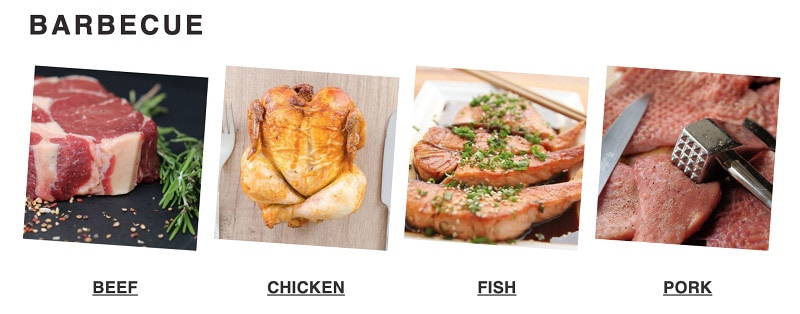
Rather than have a "Barbecue" category that you'll never rank for, with 80 posts in it, you'd simply create the appropriate categories (beef, chicken, fish, pork) with 40 recipes each, and visually group them together.
More important, you can (and should) interlink between related categories.
Make sure to set all your category fields when you configure your categories.
Click depth
Another reason for a flat category structure and 8-40 posts is click depth.
What does matter for us a little bit is how easy it is to actually find the content. So especially if your homepage is generally the strongest page on your website, and from the homepage it takes multiple clicks to actually get to one of these [pages], then that makes it a lot harder for us to understand that these [pages] are actually pretty important.
On the other hand, if it’s one click from the home page to one of these [pages] then that tells us that these [pages] are probably pretty relevant, and that probably we should be giving them a little bit of weight in the search results as well.
So it’s more a matter of how many links you have to click through to actually get to that content rather than what the URL structure itself looks like.
John Mueller, Google
Having your posts hidden behind /page/3/ of a category puts it far away from search engines, who are going to assume it's not an important part because it's buried.
The worst offender here is food blogs that use a /recipe/ category that contain 300 recipes. If the recipe on /page/28/ is only found through that category, it's all-but-invisible to search engines.
(yes, your sitemap will surface these, but search engines won't apply any importance to them because they have no links)
This is one of the reasons we dropped support for the blog page.
Duplicate categories
Another reason we recommend against nested categories is that you often run into duplicate categories. If you have egg recipes on your site, you can end up with
- /breakfast/eggs/
- /lunch/eggs/ (egg salad?)
- /appetizers/eggs/ (deviled eggs?)
Except WordPress is going to assign each egg category a unique slug, and because people don't think about this, you end up with:
- /breakfast/eggs/
- /lunch/eggs-2/
- /appetizers/eggs-3/
While search engines can infer that the child categories are related to the parent category, especially if the title + description is done properly, this isn't optimal. Deduplication is a serious issue that can affect your ability to rank.
A better setup is to have the category by explicit in what it's about. The category /breakfast-egg-recipes/ is clearly different than the /egg-appetizer-recipes/ category.
This ties back to the number of posts per category. There's really no point in having an /egg-appetizers-recipes/ (which is what /appetizers/eggs/ is) - do a Google search and you'll see there just aren't that many unique recipes.
A visitor landing on your site is much better served going directly to that post instead of a thin, uncurated category with 2 posts.
Deleting categories
Categories can be deleted or renamed over time, as your content evolves and better keyword/traffic research requires it.
Generally, you want to redirect a category to a "replacement" category if it's an acceptable substitute for the original category.
Slugs
Don't ever change the category slug.
You can change the category name, archive headline, and Yoast SEO meta tags without changing the slug.
Uncategorized
WordPress comes with a default "uncategorized" category.
We recommend using this as a to-do list: anything in this category needs to be assigned to the most relevant category for that recipe, and removed from the "uncategorized" category.
Breadcrumbs & above-the-fold content
Breadcrumbs are absolutely good for users and search engines. But nested categories (especially multiple-levels deep) end up spanning multiple lines on mobile devices, reducing the above-the-fold content that's unique to that page.
When someone lands on a specific recipe post, they're there for that recipe. They don't want to immediately jump to broader categories.
If you're looking for a frittata recipe, you aren't interested in all that blogger's breakfast recipes, so why on earth would you waste valuable screenspace with that?
(sidenote: we should do some A/B testing / heat mapping to see whether nested categories get more or less clicks than a flat structure)
Paradox of choice
It's been documented repeatedly that too many options lead to people making fewer decisions. If you present readers with too many categories, especially categories that are too broad, they may simple opt to not interact.
This is known as the paradox of choice.
While nested categories were intended to improve recipe navigation, what often happens is exactly the opposite. Each category someone clicks on presents a new array of choices to make - if I'm looking for a salad, I don't know whether I should be in:
- /lunch/salad/
- /dinner/salad/
- /appetizers/salad/
And if I now have to make a sub-category decision, I'm mentally burdened with remembering where I've visited and not visited.
Another important point is that in 99% of sites we've seen, all 3 salad categories are simply called "SALAD" and not "lunch salads" or "dinner salads" or "appetizer salads".
A much better category setup would be having keyword-focused "cold salads" and "warm salads" and "low carb salads" as parent categories.
Unfortunately, you often end up on really bad sub-categories that have 3-4 posts that just aren't what you're looking for, and have to start all over from the top.
As a visitor to your site, searching for a recipe, I'm just bouncing back to Google instead of wasting my time on poorly curated categories for one site.
Now contrast that with landing on a single page that lists all the categories, one of which is simply "salads", or "fruit salads".
By flattening your category structure, you present the visitor with a single, well-curated list of categories. This tells them: I'm an expert, and I've decided that this category represents other recipes that are likely to meet your needs.
Additional guidance
We recommend watching the SEO for bloggers episodes covering categories:
Holidays
Rather than create a category for a holiday that you'll never rank for, we recommend using the Holidays feature to organize posts into holidays without impacting categories.
Questions & Answers
Do my categories need to match my recipe card categories?
Nope!
The "categories" in the recipe card are unrelated to WordPress categories, and serve an entirely different purpose. They're used to generate Schema that Google pick up on for Google Assistant: https://webmasters.googleblog.com/2018/05/send-your-recipes-to-google-assistant.html
It doesn't make sense to try to have these align, because they're two entirely different things.