
A good site structure helps search engines understand and crawl content, and it helps visitors find related recipes.
As of 2019, we recommend a simpler website structure that will save bloggers time by removing unnecessarily complex pages, such as recipe indexes and blog pages. This new website structure consists of:
- The home page (this is a "general recipe index")
- The category pages (these are "topical recipe indexes")
- Recipe pages (more specifically, posts)
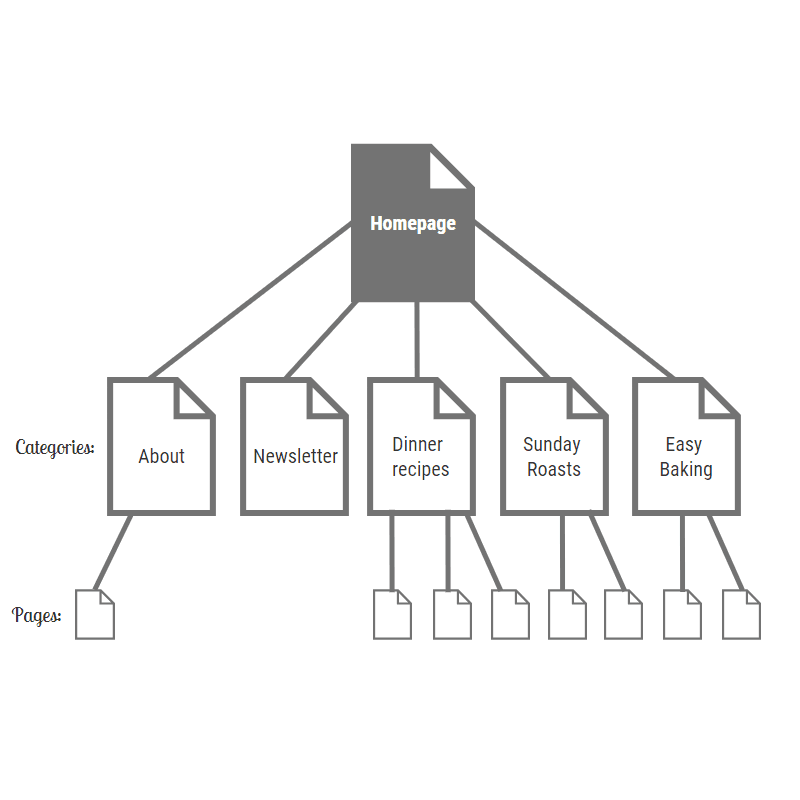
Note: we are not recommending this as the URL structure. URLs for posts should not contain the category name. Site structure is more of a mental model.
The vast majority of food blogs generate income by displaying ads on their posts. This means that the ultimate goal of your home page and category pages is to drive visitors to your posts.
This aligns with the mental framework of breadcrumbs, which should display as:
Home Page > Category Page > Recipe Post
This means that development will be focused on enhancing these pages, based on priority.
Jump to:
Priorities
In order of importance, bloggers should spend their time working on:
- Recipe pages
- Category pages
- The home page
You'll notice that these are reversed in order of the site structure.
Conceptually, many recipe pages should fall into fewer numbers of categories, which should be logically displayed on the homepage. This reflects the real world structure of recipe books: recipes are on individual pages (posts), organized by chapters (categories), and consolidated by the index (home page).
Modern Recipe Index
We recommend converting the theme-based recipe index to the Modern Recipe Index.
The Modern Recipe Index is used to link to your categories using the FSCI block, making it easier for readers to navigate your site on mobile, with screen readers, and to support good site structure.
We no longer recommend javascript-based filters or drop-down menus that aren't built for:
- providing search-engine crawlable links to your categories
- a mobile-first experience
- screen readers
Category pages
IMPORTANT: we've introduced the Modern Categories into the Feast Plugin and recommend everybody enable this. We also actively manage the number of posts displayed per category based on current best practices.
These have traditionally been overlooked by food bloggers, and represent possibly the best return-on-investment (your time) that you can focus on. Each category page has the same needs as a recipe posts, with the content:
- Being keyword-driven
- Explaining why your recipes are the best
- Explaining what the recipes on this page have in common
The category page content is edited in the Posts -> Categories -> Edit Category -> Category Archive Settings components - Archive Headline and Archive Intro Text areas. Update: we have more detailed tutorials dedicated to category pages:
- How to use categories
- Category pages need content
- How to configure the category pages
- Food blog site structure
- Simple Category Index
Just like your recipe posts, you want to aim for high-quality, relevant and unique content. 3 - 4 sentences is good for category pages. Remember: visitors are on category pages to browse recipes, so don't overwhelm them with text.
And just like your recipe posts, the content here should be keyword-driven to be unique to that page. You don't want to try to overlap the content and keywords too much with your individual recipe posts. But you do want to use keywords such as "recipe" in the Archive Headline.
Category slug: we recommend incorporating the keyword "recipes" into the slug - /chicken-recipes is better than /chicken. Use the Archive Headline field to incorporate additional keywords, such as "paleo" or "gluten free".
Another best practice is to manually link to you top performing posts within that category, in the Archive Intro Text box. You can determine what your top performing posts are by analyzing your Google "Webmaster Tools" -> Search Traffic -> Search Analytics -> Pages information.
Posts per category
We recommend limiting the number of posts per category to 40, because too many posts make it painful for visitors to find what they're looking for.
UPDATE: we recommend letting us set the optimal number of posts per page in categories using the Feast Plugin.
On the flip side, we recommend not creating a category for a topic until you have at least 4 posts for that category. This is because having too few options means that you're less likely to help a visitor find what they're looking for, and it leaves the impression the site is under-developed.
In the case of very large sites that have parent categories (not recommended), you want to set the posts per page to 40.
Nested categories
Broadly speaking, new bloggers should avoid creating nested categories (eg. category under a category). A single category can comfortably fit 40+ posts, displayed on a single category page.
When you grow beyond 40 posts in a category, it may make more sense to split the category based on the keywords the page is receiving to make it more relevant to those search terms.
In relatively rare cases (top food bloggers with 500+ posts), having 5-10 sub categories of "chicken recipes" under a main "chicken category" might make sense. At this point, hiring an SEO specialist such as Casey Markee to make recommendations to your specific site is a better move.
The Feast Plugin's Simple Category Index allows you to visually group categories without nesting them.
For additional reading, see this post on flat vs. deep from Nielson Norman Group.
The homepage
We recommend the Modern Homepage through the Feast Plugin.
Recipe indexes
The recipe index should really be the homepage - providing guidance to site visitors on how to navigate through your categories, and linking directly to your most important recipe posts.
Each category should act as it's own recipe index, displaying recipes within that category. Categories should be internally linked to other relevant categories via the category page content.
In rare cases, a separate page can be created to list categories instead of the home page, but old-school recipe indexes are thin content and hardly used at all by site visitors, making up less than 1% of pageviews on most food blogs.
Other pages
Many food bloggers have posts and pages unrelated to recipes, such as an "About Me", "Shop" or "Landing" page. These kinds of pages are best set up as WordPress "Pages", rather than inter-mingled with posts.
Note: "Landing page" is just a term used to describe a page that you send people to. Technically, this is every publicly accessible page on your website. Some bloggers set up "landing pages" to pitch visitors on a course they've developed or a book they've written - the simplest way to do this is to create a regular WordPress "Page" and select the "Full Width" layout on that page:

For blogs that have arts and crafts or other non-food related content, you can also create a category specifically for this as well.
Click depth
Click depth is the number of clicks it takes to get from your homepage to a given page. The fewer clicks it requires, the more "weight" Google gives it in the search engines.
This is one of the reasons the "blog" template is outdated. Having a post on /page/37 requires 38 clicks to get to, and basically tells the search engine it's a worthless page.
With a proper site structure using categories with content and up to 40 posts per category to avoid pagination on the category pages. It only should only ever take 3 clicks to get to your content.
We've made it simpler to visually display your categories in a user-friendly way with the Feast Plugin's Simple Category Index.
This is also a reason why we're not fans of nested categories - each level is another click.
For more information, see this post from SEJ about click depth.
Tags, author archives, date archives
We recommend not using tags, author archives or date archives. These are typically thin content pages, and unless you're very careful about intentionally using these, they provide little to no value to your readers.
They simply offer no benefit to you, or the reader. We recommend simply pretending they don't exist, not using them, and disabling or noindex'ing them in Yoast per the SEO for food bloggers guidelines.
Avoid custom "templates" at all costs
This is Skylar's personal preference when creating a page, and goes contrary to how Feast Design Co. has recommended doing things like recipe indexes and "blog pages" in the past. They provide a false sense of simplicity and are difficult to customize and maintain.
[Update 2019/06/19: Genesis has removed the blog template as well as a couple others in Genesis 3.0.0+, confirming that blog pages are generally a bad idea. Only theme versions 4.1.0+ are compatible with this change.]
Custom Post Types and Custom Templates add a huge amount of complexity for relatively little reward - they're simply not worth the effort to set up or maintain.
Instead of the "blog" page template for example, posts should be properly categorized into categories. If you have generic posts about your life that don't belong in recipe categories, you can create a category named "Blog" or "Personal" and put those posts into there.
This better aligns with a more modern food blog site structure.
Page structure
See the food blog page layout post for details around the different components of a page.
Additional reading
The featured image for this post was loving taken from https://www.interiorblogawards.com/site-structure-tips/