
Feast's Modern Sidebar is built using the block editor, instead of widgets.
- customize the sidebar more easily with the block editor
- improves SEO by linking to 4 trending recipes, and 4 seasonal recipes
- improves SEO by replacing "featured post" widgets
- improves accessibility by replacing "featured post" widgets
- improves user experience with better guidelines for sidebar content
Jump to:
1. Enable the Feast Layouts
Enable the Feast Layouts before proceeding.
2. Create the Modern Sidebar page
Navigate Admin > Feast Plugin > Setup and scroll to Modern Sidebar to automatically create the page by clicking the button:

3. Content
The sidebar should contain:
- an author-profile
- this should be 300x300px and a JPG
- an important call-to-action
- trending recipes
- seasonal content
- Possibly: "As seen in"
If you're using the Modern Homepage with a sidebar, you'll want to remove the author profile from the homepage rather than the sidebar. This is because it's important for your posts to have a user-profile in the sidebar to establish E-A-T.
Most commonly, people are using the "Full Width Modern Homepage".
Note that your sidebar is for supporting content and is not designed to contain critical information. The sidebar appears below the content on mobile, which is 80% of pageviews. See the page structure for recipe sites for more details.
Important: the sidebar ad unit is one of the highest earning ad units, and all ad companies strongly recommend that you keep your sidebar short and minimal to maximize revenue. Do not overstuff the sidebar.
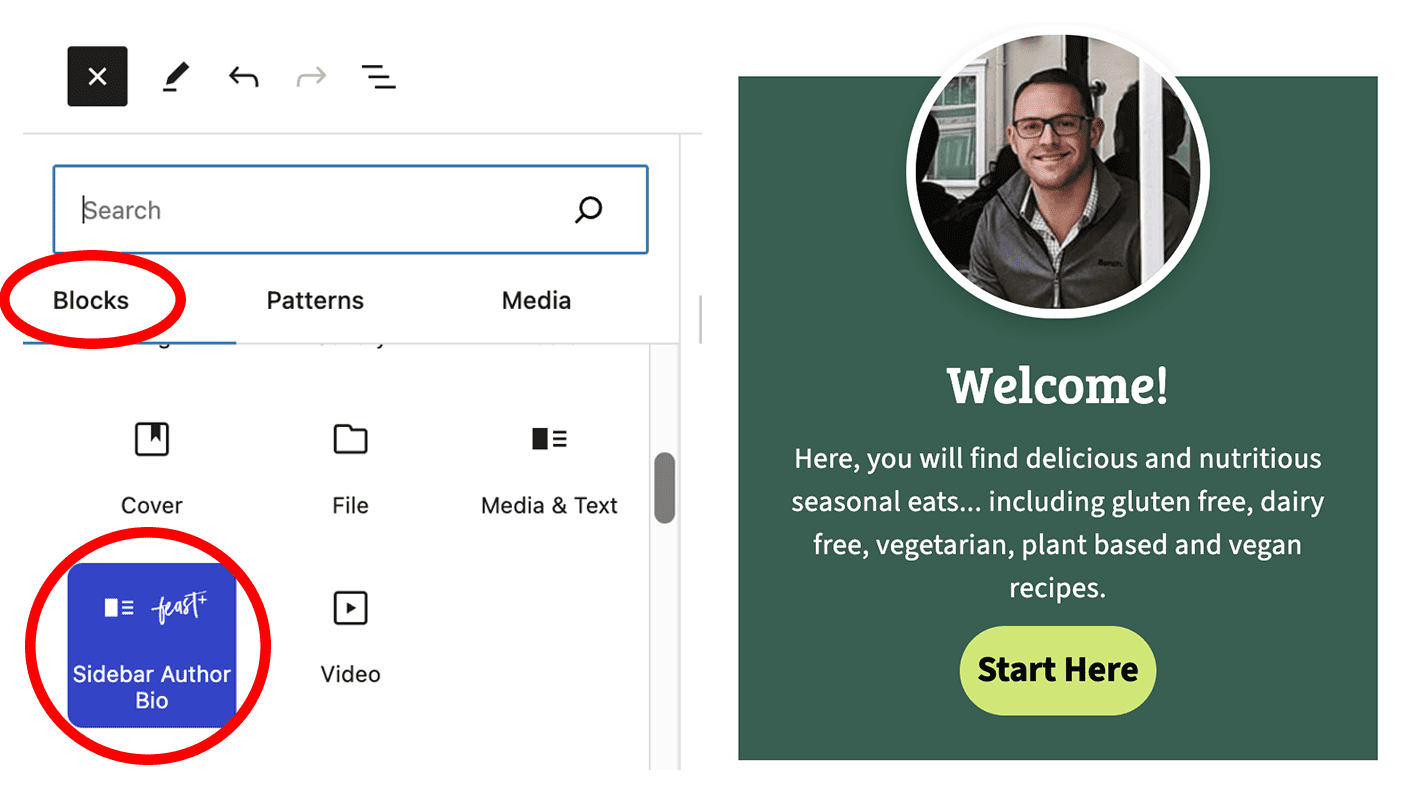
Sidebar author bio
We introduced a custom block designed to better control the layout of the sidebar author bio, which should replace any previous versions you might have.
See this video:
This image must be 300x300px and a JPG.
Feast+ automatically applies styling to this block:
Editing
There is an (edit modern sidebar) link available directly below the Modern Sidebar only when logged in as an admin (this is not visible to non admins):
Click that link to take you to the block editor for the Modern Sidebar, where you can edit it using the block editor like any other post:
Resetting
If the Modern Sidebar breaks in some unexpected way or gets over-customized, you can reset it by:
- Clicking (edit modern sidebar)
- Deleting the page in the block editor (like any other page)
- Deleting the page from the "trash"
- Going back to step #1 of this tutorial
Headings
Use only h3s in the Modern Sidebar.
Just like the footer, the sidebar is distinguished by an h2 on your site. Any headings in the Modern Sidebar need to be an h3.
All <h2> in the Modern Footer are automatically downgraded to an <h3> for accessibility compliance
Do not use any headings lower than an h3 (h4, h5, h6).
Trending recipes
Displaying your trending recipes adds reinforcing internal links to your top content, helping it perform better in search engines and surfacing your best content for your readers.
This duplicates the "trending recipes" section of the Modern Homepage.
Seasonal content
In addition to 4 "trending" recipes, we recommend having 4 "seasonal" recipes for upcoming holidays or events. This needs to be updated regularly, as the seasonal content or holiday changes.
A better option is to use the "Post IDs" section of the FSRI block to select 4 specific posts to display, which doesn't require editing the posts themselves.

FSRI display
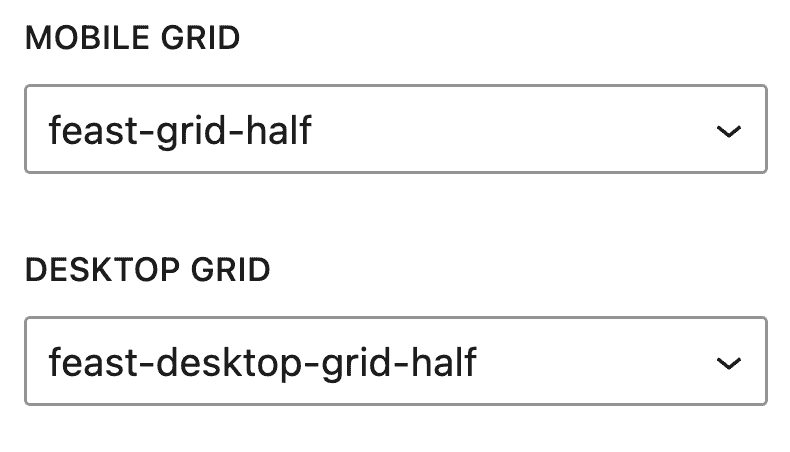
We recommend using half-width display on both mobile and desktop for the sidebar content:
Recent
Your recent recipes are general not relevant or important for readers, and will not perform well in search engines. We do not recommend putting recent recipes in the sidebar.
Don't overstuff the sidebar
The goal of the Modern Sidebar isn't to replicate the homepage. Adding too much to the sidebar will slow pagespeed because of additional DOM nodes and rendering time, and do nothing for SEO.
Keep the sidebar focused on E-A-T, promoting key content, and directing readers to a call-to-action.
Badges
We strongly recommend against putting "badges" like "Top 50 Blogger" because these are viewed as spammy and untrustworthy by readers.
Images
If you want to insert an image (such as "As seen in" or a link to buy an ebook) then it should be uploaded at 600px, and inserted at 300px.
Since the closest registered thumbnail size is 360px, you an also just upload at 300px and insert at full width.
Any images in the sidebar should not be replicated in the Modern Footer, or vice versa.
Do not put links and images or badges to third party sites as part of a "popularity" scheme (eg. "top 10 food sites 2016" or buzzfeed). These do nothing for you.
Subscribe
You can technically insert a newsletter subscribe form using the javascript snippet provided by your newsletter service, but we don't recommend this. See: Rethinking the newsletter
This is because they add javascript, which slows pagespeed, and often have very poor accessibility and SEO practices.
Additionally, readers tend to simply ignore signup forms due to banner blindness and the usefulness of these are very low.
The "Subscribe" button will be embedded into the Modern Mobile Menu so that it's always available, when the reader is ready to subscribe. This is not yet released.
Our current recommendation is to simply link to a dedicated /subscribe page that contains the subscription forms. Details for this will be released when it's available.
Search form
A search form has traditionally been included in the sidebar, but is no longer necessary because it's embedded into the Menu.
On mobile, the sidebar appears below the content, which makes it almost totally invisible to 80% of your users.
Users expect to find the search bar in the top right, or top left corner of the website, not the sidebar.
Categories drop down
We removed support for this years ago but if you're still using the categories drop down, now is the time to dump it.
See: why we're dropping support for the categories drop down menu
Translation
See translating the Feast Layouts.
Disable sidebar
You can disable the sidebar by enabling the "Full width layout" (Genesis) or "Normal" (Kadence) on the block editor for that individual page:

Genesis
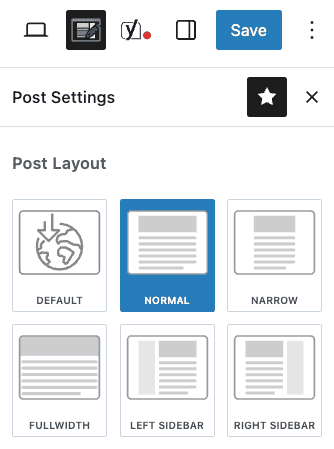
Kadence
Note that the sidebar has important site-wide links, is a major source of ad revenue, and provides E-E-A-T via the author bio in the sidebar. We strongly recommend against disabling this for any pages except the homepage and about page.
Blank sidebar
We don't recommend this, but thought it was worth mentioning.
There's a use-case for having a blank sidebar, which would cause the sidebar ad from Mediavine and Raptive to load immediately on desktop devices. This would generate immediate revenue for the sidebar ad unit on page load, even if the user doesn't scroll further, potentially increasing revenue.
The downside to this would be:
- losing the sidebar author bio
- losing site-wide internal links to top performing content
- creating a worse user-experience for visitors, because they don't like ads
- potentially slowing page speed on desktop because the ad needs to load above the fold
Patterns
The use of Patterns (formerly "Reusable Blocks") is not supported in the sidebar. The sidebar must be designed as a sidebar (always 300px wide) and the content is not appropriate for use elsewhere on the site.
Patterns do not load in the sidebar.