
Skip to content
Feast Design Co.
  • Get the Feast Plugin
  • DocumentationExpand
    • Feast Plugin
    • Feast+
  • Open a Support Ticket
New to Feast? Start Here
Login/Account
Feast Design Co.

Getting Started

3
  • Migrating to Feast
  • Staging Site
  • Sign Up For The Newsletter

Genesis Setup

15
  • Edit Post Info
  • Update Author Bio
  • Modern Navigation
  • Clear Cache ‼️
  • Layout
  • Modern Index
  • Feast Plugin Setup
  • Modern Homepage Setup
  • Modern Menu for Desktop
  • Modern Mobile Menu
  • Sidebar
  • Modern 404
  • Modern Recipe Index
  • Modern Categories
  • Modern Footer

Plugin Settings

18
  • Edit Body Font Size
  • Subscribe button
  • Social Icons
  • Recipe Key
  • Post Template
  • Table of Contents
  • Post IDs
  • Google Trusted Source
  • Edit Leave a Reply
  • Disable Trackbacks
  • Modern Previous + Next
  • Posts per page
  • Breadcrumbs
  • Productivity
  • Smooth scrolling
  • Image unlink
  • Replace recipe card Jump To buttons
  • BETA

Block Editor 101

4
  • Block Editor
  • Block themes
  • Patterns
  • Why we don't support block-level styling

Blocks & Patterns

15
  • Post Template
  • Numbered Lists
  • Table of Contents
  • Full Width Banner
  • Featured Recipe Pattern
  • Why we don't support block-level styling
  • Process Shots
  • Inline Heading Group Block
  • Step Instructions
  • Advanced "Jump To" Links
  • Reader Review
  • Feast Patterns
  • Displaying Post Blocks (FSRI)
  • Displaying Category Blocks (FSCI)
  • Scheduled Categories

Page Templates

3
  • Custom 404
  • How to use Categories
  • Shop page

Customize

8
  • Customizer
  • Customizations
  • Customization Referrals
  • Why we don't support block-level styling
  • Per Page CSS
  • Why you shouldn't make customizations
  • Custom CSS
  • Customization Support

Images

10
  • Post Images
  • Default Image Size
  • Modern post image sizes
  • How thumbnails work
  • Modern Thumbnails (Featured Images)
  • Troubleshooting Featured Images
  • Displaying Post Blocks (FSRI)
  • Process Shots
  • Image Alt Tags
  • Why do my images look different in edit post and live?

Feast+

32
  • What is Feast+?
  • Feast+ Setup
  • Design Kits
  • Feast+ Fonts
  • Feast+ FAQ
  • Feast+ Showcase
  • Feast+ Pre-Built Pages
    • Feast+ Homepage
    • Feast+ Index
    • Feast+ Category Pages
    • Social Landing Page (Link In Bio)
  • Branding & Design
    • Feast Fonts
    • Feast+ Branding & Design
  • Feast+ Patterns
    • Top Banner
    • Custom list styling
    • Numbered Lists
    • Full Width Banner
    • Feast+ Footer
    • Feast+ Call to Action
    • Icon Tip Boxes
    • As Seen In
    • Reader Review
  • Feast+ Features
    • Full-Width Post Header
    • Custom List Styling
    • Colored Numbered Lists
    • Top 10 List Styling
    • Step Instructions
    • Heading Styling
    • Top of Site CTA Banner
    • Custom Background Pattern
  • Design Kits
    • Feast+ Design Kits (Members)
    • Feast+ Design Kit Library
    • Feast+ Design Kit Instructions

Recipes

7
  • Reviews
  • Recipe Key
  • Ingredients
  • Displaying Category Blocks (FSCI)
  • Displaying Post Blocks (FSRI)
  • Featured Recipe Pattern
  • All Recipes

Social Sharing

2
  • Social Icons
  • Tiktok

Logo & Fonts

5
  • Retina Quality Logo
  • Create your logo
  • Edit Body Font Size
  • Fonts
  • Logo

Categories

3
  • Why Isn't the Category Description Appearing?
  • Displaying Category Blocks (FSCI)
  • How to use Categories

Blogging Resources

15
  • Food Blog Sitelinks
  • Photography
  • Understanding "penalties"
  • Food Blog Page Structure
  • Food Blog Site Structure
  • Comments
  • Internal links
  • Analytics
  • Pagespeed
  • SEO for Food Bloggers
  • Modern guidelines for page headings
  • How to Write a Recipe Post
  • Recipe Page Guidelines for Food Bloggers
  • Image Optimization
  • Recipe Update Checklist

Speed & SEO

18
  • Image Alt Tags
  • Speculative Loading
  • Google Trusted Source
  • 301 Redirects, Links, Canonical and Pagespeed
  • Image file size vs. pagespeed
  • Duplicate Content
  • Lazyloading comments
  • CLS
  • Blocking Time
  • SEO
  • Skip lazy loading first post image
  • Horizontal scrolling
  • Smooth scrolling
  • Pagination
  • Pingbacks
  • INP (Interaction to Next Paint)
  • CDNs
  • Site Speed

Legal Resources

5
  • Legal Resources
  • DMCA and Copyright Infringement
  • Copyrights
  • Accessibility
  • Private Label Rights (PLR)

Troubleshooting

10
  • Why do my images look different in edit post and live?
  • Why Isn't the Category Description Appearing?
  • Troubleshoot Plugin Conflicts
  • How to update your theme
  • Feast Plugin FAQ
  • W3 HTML Validation
  • Sorry, this file type is not permitted for security reasons.
  • Troubleshooting Featured Images
  • Either "name" or "item. name" should be specified (in "itemListElement")
  • Clear Cache ‼️

Compatibility

2
  • Compatibility
  • WP 6.7

Integrations

8
  • Ecommerce
  • Ingredients
  • Google Trusted Source
  • Contact Forms
  • Translation
  • WP Recipe Maker
    • Reviews
    • QR Code
    • Ingredients

Developer Resources

6
  • Multisite
  • Feast Plugin Deprecated
  • W3 HTML Validation
  • Feast Plugin: Disable Theme Google Fonts
  • Rethinking the Thumbnails
  • Design
View Categories
  • Home
  • Documentation
  • Genesis (Legacy)
  • Plugin Settings
  • Modern Previous + Next

Modern Previous + Next

The original "Related Posts" feature built into most themes was designed for a time when blogs were blogs - chronological lists of posts.

But this is 2025, and blogs are dead. Modern content sites require proper site structure and content categorization.

People search for specific topics, and expect your linked content to be related.

The Modern Previous + Next replaces the 2 date-based text links at the bottom of posts, with 4 image+text links within the same parent category.

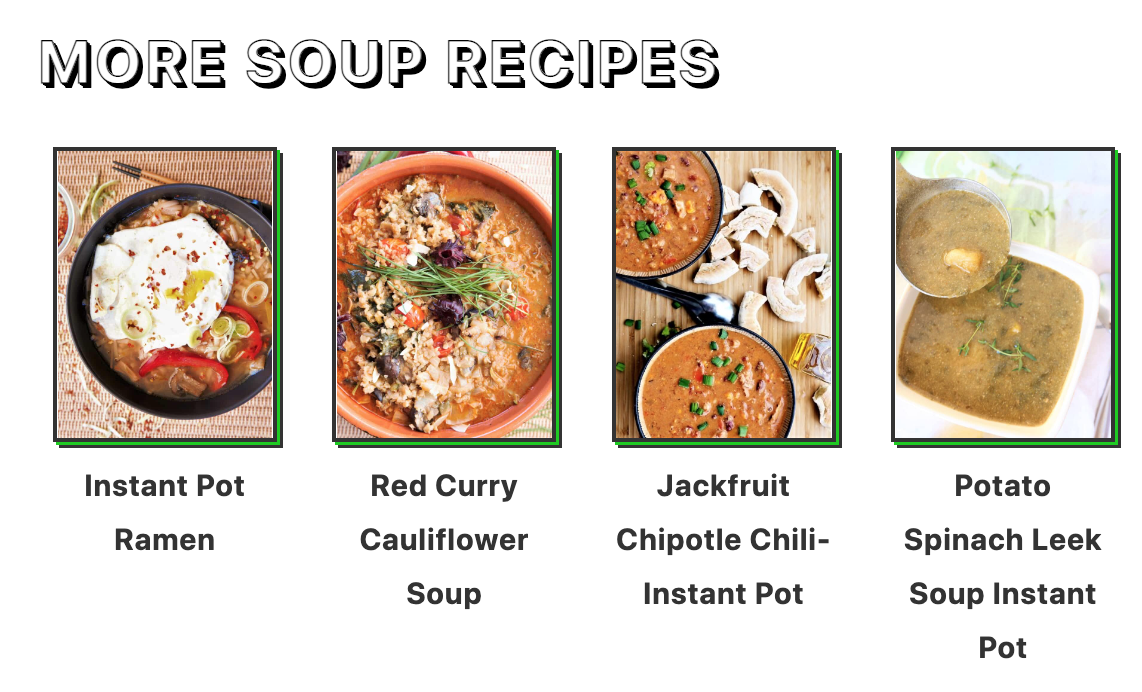
before: unrelated posts, chosen chronologically
after: visually appealing, related recipes

This is done to:

  • improve user experience by providing more relevant content to pick from
  • boost click through rates to relevant posts, earning more ad revenue
  • better internally link to relevant content for SEO

Modern recipe sites need to be designed to display topically related content, not just what you happened to make the previous week, or next week.

If I land on your site for a quinoa powerbowl, I want other powerbowl recipes.

What I don't want is the german chocolate cake recipe you made the week before, or a crantini recipe you made the week after. These just aren't relevant to what I was looking for.

Jump to:
  • Activate
  • How posts are chosen
  • Customizing the heading
  • No posts showing
  • Can I remove it from specific posts?
  • Troubleshooting

Activate

Simply enable this in the Feast Plugin to activate it:

setting to enable the modern previous + next

How posts are chosen

If Yoast is enabled and the primary category is set for that post, it uses the primary category to display posts. This is the best practice.

If a primary category hasn't been set, this will simply get the first selected category on the "edit post" page. Not the best option, but better than chronologically chosen.

Note: in order to keep links persistent (eg. they don't change when the page is reloaded) and maintain variety we select the posts published within that category before the current one, chronologically.

This ensures that all posts get linked to, back to the oldest post in the category.

Customizing the heading

You can customize the heading under the "Post Settings" section of the Feast Plugin:
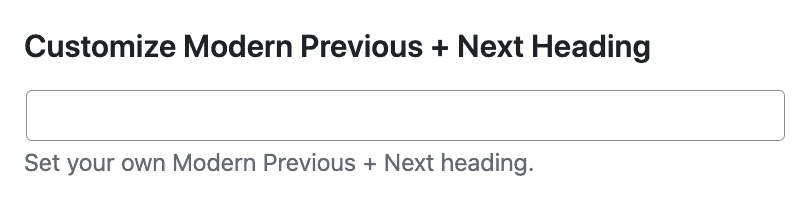
You can also dynamically insert the category fields with the words "title" and "name":

  • The word "title" will be replaced with the "Archive Title" field
  • The word "name" will be replaced with the category "Name" field

No posts showing

If you're getting the message "No category found with the slug soup-and-chili, or it doesn't have any posts in it." then:

  • you may have no posts to display in the category
  • you may have displayed the posts elsewhere on the page such as in an FSRI block or the filmstrip, which excludes those posts from being displayed below

The solution to this is may be to:

  • not create categories that have less than 4 posts, by following our category guidelines
  • change the Yoast primary category to one with more content
  • remove the filmstrip via the Feast Plugin settings
  • Note: we don't recommend removing an FSRI block from your content because that's the most important and relevant place to link from

Can I remove it from specific posts?

No, the Modern Previous + Next is a site-wide setting and can't be disabled on a post-by-post basis.

Troubleshooting

Irregular image sizes

By default, we use the default featured image size and fall back to the "medium" image thumbnail, which doesn't crop the image to a specific ratio. To resolve this, re-upload the featured images at our recommended size: 1200x1200 square.

Alternatively, you can select a thumbnail size that forces cropping such as:

  • feast-square-1x1-360x360
  • feast-landscape-4x3-360x270
  • feast-portrait-2x3-360x540

We recommend either a square or landscape (horizontal) thumbnail that's at least 360px wide.

No image showing

This is likely because your post does not have a featured image.

Go to the post, and set the featured image.

Why is it showing unrelated recipes

This is usually caused by having a general "recipes" category (or "uncategorized") and either having that set as the Yoast Primary Category in the post editor, or not having a primary category set at all.

To solve this, assign the post to the best parent category.

Was this helpful?

  • Happy
  • Sad
Disable TrackbacksPosts per page

Products

  • Feast Plugin
  • Feast+
  • Feast+ White Glove
  • Feast+ Style Refresh
  • Done-for-you Services
  • Demo trial
  • Themes
  • Theme Install Service
  • Classic Themes
  • Lattice Plugin
  • Travel
  • Logo creation

Help

  • Kadence tutorials
  • Kadence Install
  • Documentation & Tutorials
  • Feast+ Members
  • Discounts & Coupons
  • Trellis 2.0
  • Trellis
  • Trellis Migration
  • Compatibility
  • Support
  • Legal resources
  • Genesis vs. Kadence
  • Changelog
  • How to start a blog course

Company

  • Privacy Policy
  • Refund Policy
  • Terms & Conditions
  • Why Feast
  • Principles & Best Practices
  • Affiliates
  • Contact
  • Opinion Disclaimer
  • AI Policy

Copyright ©  2026 · Feast Design Co. Results not typical or guaranteed. Our themes and plugins are just a small part of the overall effort involved in running a food blog. Nothing on this website shall constitute legal or financial advice, always consult a local lawyer and accountant. Accessing this website and all transactions herein are under the laws and jurisdiction of Toronto, Ontario, Canada. All pricing is USD.

  • Get the Feast Plugin
  • Documentation
    • Feast Plugin
    • Feast+
  • Open a Support Ticket
Facebook X Instagram
Search