
Skip to content
Feast Design Co.
  • Get the Feast Plugin
  • DocumentationExpand
    • Feast Plugin
    • Feast+
  • Open a Support Ticket
New to Feast? Start Here
Login/Account
Feast Design Co.

Genesis Setup

15
  • Edit Post Info
  • Update Author Bio
  • Modern Navigation
  • Clear Cache ‼️
  • Layout
  • Modern Index
  • Feast Plugin Setup
  • Modern Homepage Setup
  • Modern Menu for Desktop
  • Modern Mobile Menu
  • Sidebar
  • Modern 404
  • Modern Recipe Index
  • Modern Categories
  • Modern Footer

Getting Started

3
  • Migrating to Feast
  • Staging Site
  • Sign Up For The Newsletter

Setup

11
  • Install The Plugin
  • Enable Recommended Settings
  • Enable Feast Layouts
  • Disable Trackbacks
  • Complete Site Info
  • Update Author Bio
  • Optimize Images
  • Clear Inactive Widgets
  • Review Tools
  • Plugin Audit
  • Clear Cache ‼️

Plugin Settings

18
  • Edit Body Font Size
  • Subscribe button
  • Social Icons
  • Recipe Key
  • Post Template
  • Table of Contents
  • Post IDs
  • Google Trusted Source
  • Edit Leave a Reply
  • Disable Trackbacks
  • Modern Previous + Next
  • Posts per page
  • Breadcrumbs
  • Productivity
  • Smooth scrolling
  • Image unlink
  • Replace recipe card Jump To buttons
  • BETA

Block Editor 101

4
  • Block Editor
  • Block themes
  • Patterns
  • Why we don't support block-level styling

Blocks & Patterns

15
  • Post Template
  • Numbered Lists
  • Table of Contents
  • Full Width Banner
  • Featured Recipe Pattern
  • Why we don't support block-level styling
  • Process Shots
  • Inline Heading Group Block
  • Step Instructions
  • Advanced "Jump To" Links
  • Reader Review
  • Feast Patterns
  • Displaying Post Blocks (FSRI)
  • Displaying Category Blocks (FSCI)
  • Scheduled Categories

Page Templates

3
  • Custom 404
  • How to use Categories
  • Shop page

Customize

8
  • Customizer
  • Customizations
  • Customization Referrals
  • Why we don't support block-level styling
  • Per Page CSS
  • Why you shouldn't make customizations
  • Custom CSS
  • Customization Support

Images

10
  • Post Images
  • Default Image Size
  • Modern post image sizes
  • How thumbnails work
  • Modern Thumbnails (Featured Images)
  • Troubleshooting Featured Images
  • Displaying Post Blocks (FSRI)
  • Process Shots
  • Image Alt Tags
  • Why do my images look different in edit post and live?

Feast+

32
  • What is Feast+?
  • Feast+ Setup
  • Design Kits
  • Feast+ Fonts
  • Feast+ FAQ
  • Feast+ Showcase
  • Feast+ Patterns
    • Top Banner
    • Custom list styling
    • Numbered Lists
    • Full Width Banner
    • Feast+ Footer
    • Feast+ Call to Action
    • Icon Tip Boxes
    • As Seen In
    • Reader Review
  • Feast+ Pre-Built Pages
    • Feast+ Homepage
    • Feast+ Index
    • Feast+ Category Pages
    • Social Landing Page (Link In Bio)
  • Branding & Design
    • Feast Fonts
    • Feast+ Branding & Design
  • Feast+ Features
    • Full-Width Post Header
    • Custom List Styling
    • Colored Numbered Lists
    • Top 10 List Styling
    • Step Instructions
    • Heading Styling
    • Top of Site CTA Banner
    • Custom Background Pattern
  • Design Kits
    • Feast+ Design Kits (Members)
    • Feast+ Design Kit Library
    • Feast+ Design Kit Instructions

Recipes

7
  • Reviews
  • Recipe Key
  • Ingredients
  • Displaying Category Blocks (FSCI)
  • Displaying Post Blocks (FSRI)
  • Featured Recipe Pattern
  • All Recipes

Social Sharing

2
  • Social Icons
  • Tiktok

Logo & Fonts

5
  • Retina Quality Logo
  • Create your logo
  • Edit Body Font Size
  • Fonts
  • Logo

Categories

3
  • Why Isn't the Category Description Appearing?
  • Displaying Category Blocks (FSCI)
  • How to use Categories

Blogging Resources

15
  • Food Blog Sitelinks
  • Photography
  • Understanding "penalties"
  • Food Blog Page Structure
  • Food Blog Site Structure
  • Comments
  • Internal links
  • Analytics
  • Pagespeed
  • SEO for Food Bloggers
  • Modern guidelines for page headings
  • How to Write a Recipe Post
  • Recipe Page Guidelines for Food Bloggers
  • Image Optimization
  • Recipe Update Checklist

Speed & SEO

18
  • Image Alt Tags
  • Speculative Loading
  • Google Trusted Source
  • 301 Redirects, Links, Canonical and Pagespeed
  • Image file size vs. pagespeed
  • Duplicate Content
  • Lazyloading comments
  • CLS
  • Blocking Time
  • SEO
  • Skip lazy loading first post image
  • Horizontal scrolling
  • Smooth scrolling
  • Pagination
  • Pingbacks
  • INP (Interaction to Next Paint)
  • CDNs
  • Site Speed

Legal Resources

5
  • Legal Resources
  • DMCA and Copyright Infringement
  • Copyrights
  • Accessibility
  • Private Label Rights (PLR)

Troubleshooting

10
  • Why do my images look different in edit post and live?
  • Why Isn't the Category Description Appearing?
  • Troubleshoot Plugin Conflicts
  • How to update your theme
  • Feast Plugin FAQ
  • W3 HTML Validation
  • Sorry, this file type is not permitted for security reasons.
  • Troubleshooting Featured Images
  • Either "name" or "item. name" should be specified (in "itemListElement")
  • Clear Cache ‼️

Compatibility

2
  • Compatibility
  • WP 6.7

Integrations

8
  • Ecommerce
  • Ingredients
  • Google Trusted Source
  • Contact Forms
  • Translation
  • WP Recipe Maker
    • Reviews
    • QR Code
    • Ingredients

Developer Resources

6
  • Multisite
  • Feast Plugin Deprecated
  • W3 HTML Validation
  • Feast Plugin: Disable Theme Google Fonts
  • Rethinking the Thumbnails
  • Design
View Categories
  • Home
  • Documentation
  • Feast+
  • Feast+ Fonts

Feast+ Fonts

Jump to:
  • Available Fonts
  • Feast Fonts
  • Google Fonts GDPR
  • Font pairings
  • Accent font

Available Fonts

While you can technically add any Google Font in the fonts section, they won't all work. We've defined a specific subset of fonts that we've tested to ensure:

  • they load quickly
  • they don't cause CLS
  • they have the correct font weights (eg. boldness)

We recommend using the Feast Fonts plugin found in your downloads.

Fonts we recommend and support:

Heading Fonts

  • Agbalumo
  • Aleo*
  • Caprasimo
  • Fredoka
  • Inter*
  • Josefin Sans*
  • Karma*
  • Lato*
  • Montserrat*
  • Open Sans*
  • Poppins*
  • Quicksand*
  • Raleway*
  • Rubik*
  • Source Sans 3*
  • Source Serif 4*
  • Abril Fatface
  • Bree Serif
  • EB Garamond*
  • Josefin Slab*
  • Lora*
  • Libre Baskerville*
  • Marcellus
  • Playfair Display*

Body Copy Fonts

  • Open Sans
  • Inter
  • Lato
  • Source Sans 3
  • Quicksand
  • Raleway
  • Rubik

Accent Fonts

  • Caveat
  • Cookie
  • Corinthia
  • Dancing Script
  • Homemade Apple
  • Meow Script
  • Ms Madi
  • Oooh Baby
  • Orelega One
  • Playball
  • Rochester
  • Satisfy
  • Sriracha

* Headings marked with an asterisk have both regular and bold weights available. You can set this under "Heading Weight" on the Feast+ Branding Page.

Font Pairing Ideas:

Choosing another Google Font that isn't listed enough may result in:

  • downloading very large font files (eg. 500+ kb) which will slow your page speed due to downloading font subsets that aren't used on the site
  • choosing a font whose heights don't match the system font height, which results in the font size increasing/decreasing, which results in CLS
  • using a font that doesn't have all the necessary fractions needed for recipe sites

Font weights

Many fonts have up to 9 different boldness options, defined in increments of 100 through 900. There's also italic variations for some, but not all, weights.

We've considered adding the ability to specify your own font weights so that other fonts can be used, but it's impossible for us to test every font weight for every font to make sure it's safe for CLS. It also adds a huge technical burden to you to understand how to check which weight is needed.

Trying to load a font weight at 800, which doesn't have 800 as an option, means the font simply doesn't load at all.

You can set select headings to regular & bold using the list above.

Font pagespeed

We thought about maybe building a list of all font weights for a certain subset of fonts, but loading them all would cause pagespeed problems, and the majority of those weights would never be used.

And that doesn't even account for things like italics, which are often not available for every font weight (or at all).

Because of all this, we're sticking with 2 font options: 1 for the body, 1 for the heading.

  • the body font gets loaded at font weight 400 (normal) and 800 (bold)
  • the heading font gets loaded at font weight 800 (bold)
    • note: we've made some exceptions to this for certain fonts and handled it automatically on the back end

We've tediously checked our font recommendations in the getting started guide, including fractions for the body fonts, to minimize your potential complications.

We've also spent considerable time pairing the fonts together to make sure they work cohesively, from an aesthetic standpoint.

Note: Google is working on some CSS specifications to allow better control over fonts to better control font widths and heights but this is years off being usable.

Despite all this optimization, using a Google Font will have some level of negative impact on pagespeed and opting not to use a Google Font in favor of the system fonts (default) will result in better pagespeed scores. Whether it's worth the trade-off is a personal decision you need to make.

All Feast+ sites we're aware of use Google Fonts and are able to pass pagespeed/CWV if the rest of the site is optimized (eg. javascript, plugins, server, caching, etc).

Custom fonts

We simply can't support all of the thousands of font options at Google so any font not specifically listed above is not supported.

You can still use a custom Google Font if you're able to:

  • understand how to load fonts
  • choose the appropriate weight
  • control it with CSS
  • check for fractions
  • check for CLS
  • monitor and respond to changes over time (eg. Google removing the font, or font weight)

Then you can opt to not use our font setup and do it yourself.

Feast Fonts

You can install the Feast Fonts Plugin to host our recommended Google Fonts locally on your site, which should improve pagespeed and avoid the GDPR issues below.

Note that this only impacts the Feast setup and not any third party scripts or plugins.

The list of available Feast Fonts can be found here.

Google Fonts GDPR

Loading fonts from Google (as implemented by Feast+, and any non-custom-theme) is a violation of GDPR.

Whether this matters to you or not is a discussion you'd have to have with your lawyer. Anything you read online about this is worthless.

If you want to reduce your Google-font-specific exposure, you can use the OMGF plugin to automatically download and cache fonts on your server. The plugin has good documentation and tends to work well.

Any issues you run into with this will need to be addressed with the plugin developer, your host, or NerdPress.

Most notably, OMGF caches fonts fairly aggressively which means that new fonts you set won't be displayed until the font cache has been cleared.

OMGF also has special requires for translations.

Font pairings

We've tested and adjusted the following fonts to ensure no (or minimal) CLS. The fonts below are designer-approved pairings for the accent font, heading, and body copy.
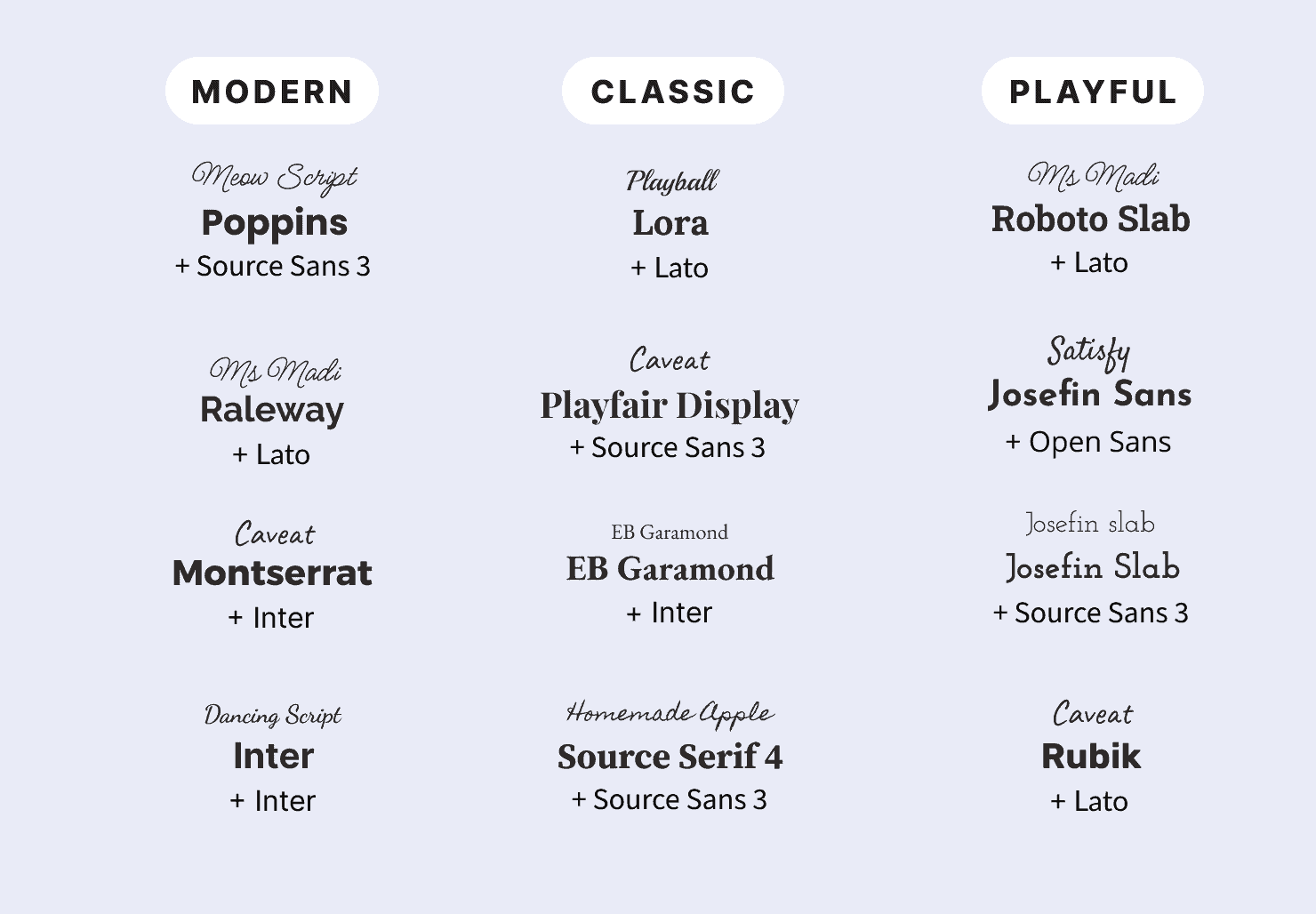
Accent font

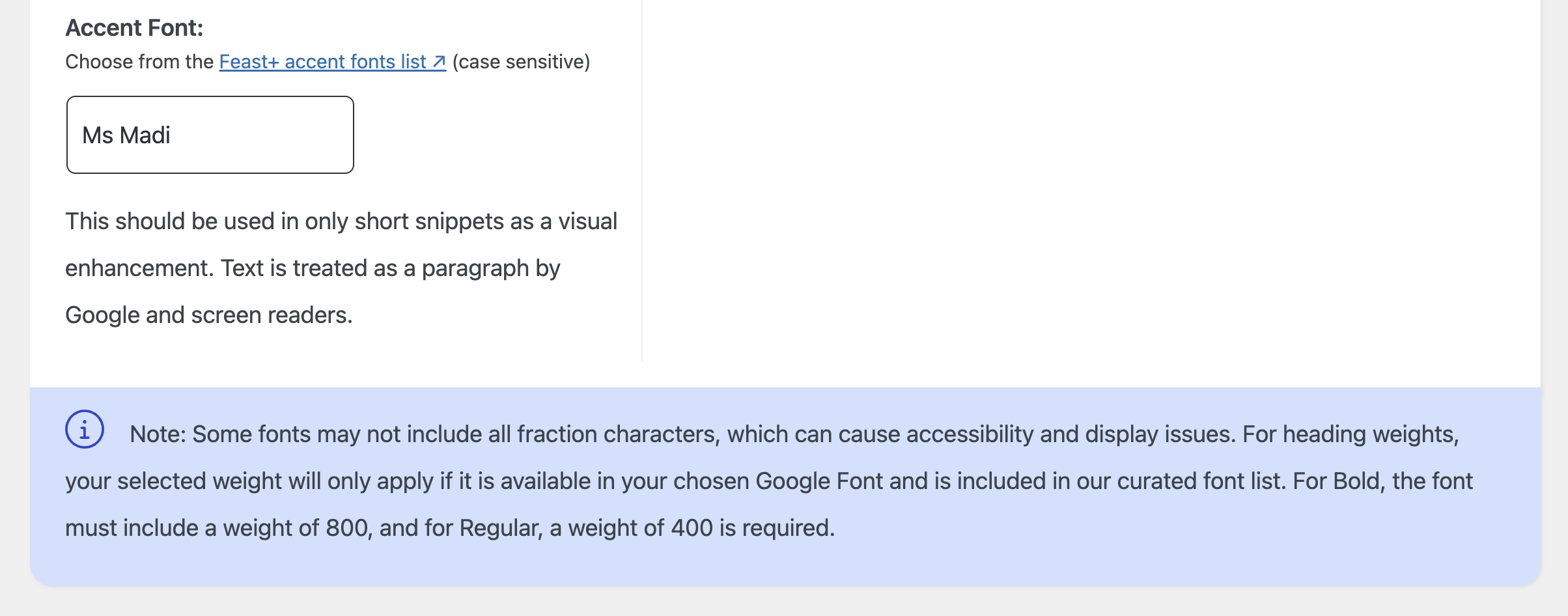
You can now set an accent font on the Feast+ Branding page.
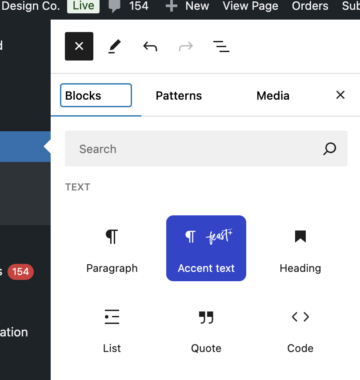
The accent font is inserted via the new Accent Text block using the [+] button in the block editor:
This should be used primarily for small calls to action and pre-header text. It's treated by search engines and screen readers as simple paragraph text.

Due to a lack of support in most handwriting-style fonts, bold and italics are not options on this text.

Choosing an Accent Font

The below fonts were curated by Melissa as fonts that felt most professional and readable. If choosing your own font from Google Fonts, be sure to consider legibility. We recommend avoiding fonts that are all-caps by default, as it's hard to maintain proper sentence case while typing and you will likely need to edit the text later if you change the font.

Not a fan of these styles of fonts? In most cases, the heading font you are using will also make for a great accent font, so feel free to use the same font for both!

Was this helpful?

  • Happy
  • Sad
Design KitsFeast+ FAQ

Products

  • Feast Plugin
  • Feast+
  • Feast+ White Glove
  • Feast+ Style Refresh
  • Done-for-you Services
  • Demo trial
  • Themes
  • Theme Install Service
  • Classic Themes
  • Lattice Plugin
  • Travel
  • Logo creation

Help

  • Kadence tutorials
  • Kadence Install
  • Documentation & Tutorials
  • Feast+ Members
  • Discounts & Coupons
  • Trellis 2.0
  • Trellis
  • Trellis Migration
  • Compatibility
  • Support
  • Legal resources
  • Genesis vs. Kadence
  • Changelog
  • How to start a blog course

Company

  • Privacy Policy
  • Refund Policy
  • Terms & Conditions
  • Why Feast
  • Principles & Best Practices
  • Affiliates
  • Contact
  • Opinion Disclaimer
  • AI Policy

Copyright ©  2026 · Feast Design Co. Results not typical or guaranteed. Our themes and plugins are just a small part of the overall effort involved in running a food blog. Nothing on this website shall constitute legal or financial advice, always consult a local lawyer and accountant. Accessing this website and all transactions herein are under the laws and jurisdiction of Toronto, Ontario, Canada. All pricing is USD.

  • Get the Feast Plugin
  • Documentation
    • Feast Plugin
    • Feast+
  • Open a Support Ticket
Facebook X Instagram
Search