
Skip to content
Feast Design Co.
  • Get the Feast Plugin
  • DocumentationExpand
    • Feast Plugin
    • Feast+
  • Open a Support Ticket
New to Feast? Start Here
Login/Account
Feast Design Co.

Getting Started

3
  • Migrating to Feast
  • Staging Site
  • Sign Up For The Newsletter

Genesis Setup

15
  • Edit Post Info
  • Update Author Bio
  • Modern Navigation
  • Clear Cache ‼️
  • Layout
  • Modern Index
  • Feast Plugin Setup
  • Modern Homepage Setup
  • Modern Menu for Desktop
  • Modern Mobile Menu
  • Sidebar
  • Modern 404
  • Modern Recipe Index
  • Modern Categories
  • Modern Footer

Plugin Settings

18
  • Edit Body Font Size
  • Subscribe button
  • Social Icons
  • Recipe Key
  • Post Template
  • Table of Contents
  • Post IDs
  • Google Trusted Source
  • Edit Leave a Reply
  • Disable Trackbacks
  • Modern Previous + Next
  • Posts per page
  • Breadcrumbs
  • Productivity
  • Smooth scrolling
  • Image unlink
  • Replace recipe card Jump To buttons
  • BETA

Block Editor 101

4
  • Block Editor
  • Block themes
  • Patterns
  • Why we don't support block-level styling

Page Templates

3
  • Custom 404
  • How to use Categories
  • Shop page

Blocks & Patterns

15
  • Post Template
  • Numbered Lists
  • Table of Contents
  • Full Width Banner
  • Featured Recipe Pattern
  • Why we don't support block-level styling
  • Process Shots
  • Inline Heading Group Block
  • Step Instructions
  • Advanced "Jump To" Links
  • Reader Review
  • Feast Patterns
  • Displaying Post Blocks (FSRI)
  • Displaying Category Blocks (FSCI)
  • Scheduled Categories

Customize

8
  • Customizer
  • Customizations
  • Customization Referrals
  • Why we don't support block-level styling
  • Per Page CSS
  • Why you shouldn't make customizations
  • Custom CSS
  • Customization Support

Images

10
  • Post Images
  • Default Image Size
  • Modern post image sizes
  • How thumbnails work
  • Modern Thumbnails (Featured Images)
  • Troubleshooting Featured Images
  • Displaying Post Blocks (FSRI)
  • Process Shots
  • Image Alt Tags
  • Why do my images look different in edit post and live?

Feast+

32
  • What is Feast+?
  • Feast+ Setup
  • Design Kits
  • Feast+ Fonts
  • Feast+ FAQ
  • Feast+ Showcase
  • Feast+ Patterns
    • Top Banner
    • Custom list styling
    • Numbered Lists
    • Full Width Banner
    • Feast+ Footer
    • Feast+ Call to Action
    • Icon Tip Boxes
    • As Seen In
    • Reader Review
  • Feast+ Pre-Built Pages
    • Feast+ Homepage
    • Feast+ Index
    • Feast+ Category Pages
    • Social Landing Page (Link In Bio)
  • Branding & Design
    • Feast Fonts
    • Feast+ Branding & Design
  • Feast+ Features
    • Full-Width Post Header
    • Custom List Styling
    • Colored Numbered Lists
    • Top 10 List Styling
    • Step Instructions
    • Heading Styling
    • Top of Site CTA Banner
    • Custom Background Pattern
  • Design Kits
    • Feast+ Design Kits (Members)
    • Feast+ Design Kit Library
    • Feast+ Design Kit Instructions

Recipes

7
  • Reviews
  • Recipe Key
  • Ingredients
  • Displaying Category Blocks (FSCI)
  • Displaying Post Blocks (FSRI)
  • Featured Recipe Pattern
  • All Recipes

Social Sharing

2
  • Social Icons
  • Tiktok

Logo & Fonts

5
  • Retina Quality Logo
  • Create your logo
  • Edit Body Font Size
  • Fonts
  • Logo

Categories

3
  • Why Isn't the Category Description Appearing?
  • Displaying Category Blocks (FSCI)
  • How to use Categories

Speed & SEO

18
  • Image Alt Tags
  • Speculative Loading
  • Google Trusted Source
  • 301 Redirects, Links, Canonical and Pagespeed
  • Image file size vs. pagespeed
  • Duplicate Content
  • Lazyloading comments
  • CLS
  • Blocking Time
  • SEO
  • Skip lazy loading first post image
  • Horizontal scrolling
  • Smooth scrolling
  • Pagination
  • Pingbacks
  • INP (Interaction to Next Paint)
  • CDNs
  • Site Speed

Blogging Resources

15
  • Food Blog Sitelinks
  • Photography
  • Understanding "penalties"
  • Food Blog Page Structure
  • Food Blog Site Structure
  • Comments
  • Internal links
  • Analytics
  • Pagespeed
  • SEO for Food Bloggers
  • Modern guidelines for page headings
  • How to Write a Recipe Post
  • Recipe Page Guidelines for Food Bloggers
  • Image Optimization
  • Recipe Update Checklist

Legal Resources

5
  • Legal Resources
  • DMCA and Copyright Infringement
  • Copyrights
  • Accessibility
  • Private Label Rights (PLR)

Troubleshooting

10
  • Why do my images look different in edit post and live?
  • Why Isn't the Category Description Appearing?
  • Troubleshoot Plugin Conflicts
  • How to update your theme
  • Feast Plugin FAQ
  • W3 HTML Validation
  • Sorry, this file type is not permitted for security reasons.
  • Troubleshooting Featured Images
  • Either "name" or "item. name" should be specified (in "itemListElement")
  • Clear Cache ‼️

Compatibility

2
  • Compatibility
  • WP 6.7

Integrations

8
  • Ecommerce
  • Ingredients
  • Google Trusted Source
  • Contact Forms
  • Translation
  • WP Recipe Maker
    • Reviews
    • QR Code
    • Ingredients

Developer Resources

6
  • Multisite
  • Feast Plugin Deprecated
  • W3 HTML Validation
  • Feast Plugin: Disable Theme Google Fonts
  • Rethinking the Thumbnails
  • Design
View Categories
  • Home
  • Documentation
  • Genesis (Legacy)
  • Genesis Setup
  • Edit Post Info

Edit Post Info

This tutorial applies to our Genesis themes, see the Kadence tutorials for our Kadence themes.

This tutorial features the Feast Plugin, which enhances and extends your theme to improve SEO, pagespeed, accessibility and user experience.

The Edit Post Info feature enables bloggers to customize the post info of their recipe posts. Customizing and improving your post info allows you to gain an advantage over food blogs that haven't put the time and effort into these areas.
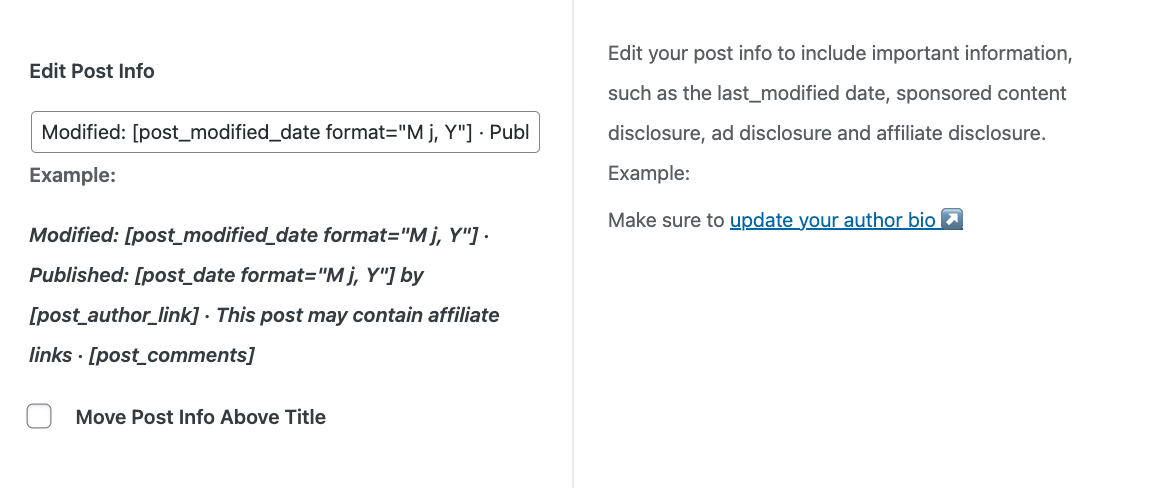
It completely overrides whatever is in the theme default + Genesis Simple Edits.

Jump to:
  • How it works
  • datePublished and dateModified schema
  • Search engines
  • Editing
  • Updated before Published
  • Author Information
  • FTC Disclosures
  • Conditionally display Updated date
  • One-Date Logic
  • Dates as a ranking factor
  • Accessibility
  • Bold text
  • Move Post Info Above Title

How it works

It's no secret that visitors and search engines love details. Easily edit your post info to provide the date published, date updated and other details such as disclosures.

We've long advocated that your recipes should be evergreen and that dates shouldn't impact your content, and we still do.

But recent data shows that having date published and date modified are a good user experience, and may help search engine ranking due to additional schema.

Schema Data

Note: This only updates the post info on the post page. We do not recommend that you display post-info data on the home page or category pages.

datePublished and dateModified schema
See this post about why search engines like Google love having date information on posts.

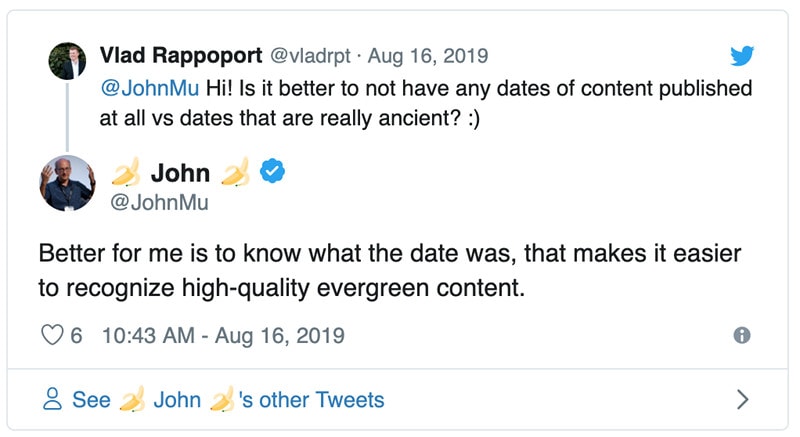
Here's Google's John Mueller re-iterating that showing the published (and last updated) date is good for users:
Search engines

While you can inform search engines what you'd prefer to display, you have no control over what they actually decide to use or display. Nothing can be done if Google decides to display the published date, updated date, or no date at all.

Note that Raptive has stated that placing the Modified date before the Published date increases the likelihood of Google showing the most recent date (modified) which tends to attract user clicks.

Editing

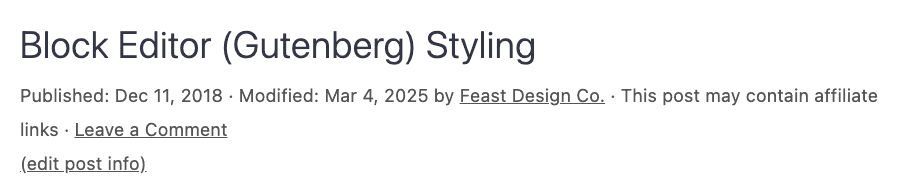
The Edit Post Info can be accessed either by clicking the (edit post info) link on your post:
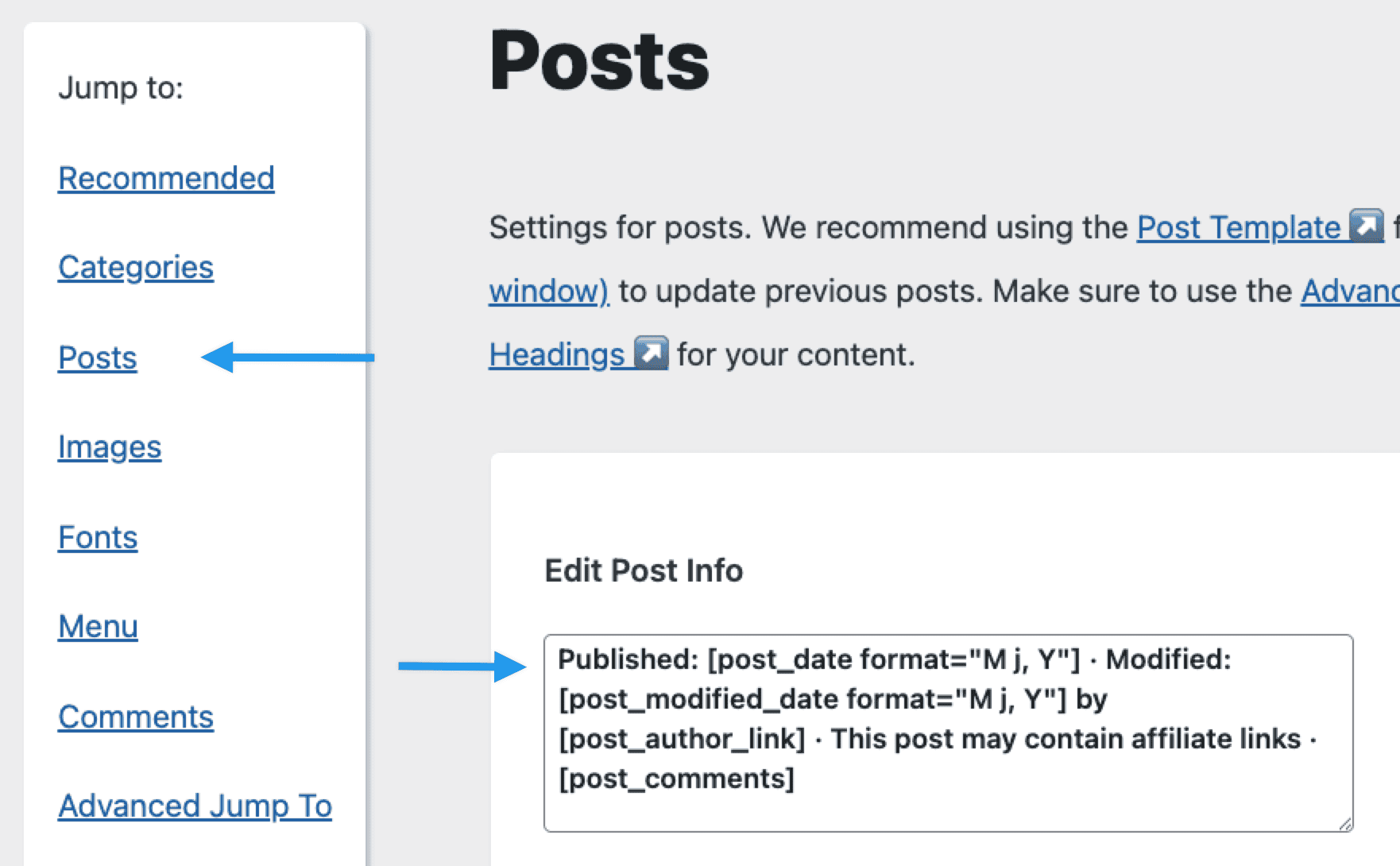
Or by visiting the Feast Plugin Settings page and scrolling to the Edit Post Info setting in the Posts section:
Updated before Published

One thing that can be done to influence Google to display the most recent (updated) date is to place it before the published date in your post info.

Our current default template is:

Modified: [post_modified_date format="M j, Y"] · Published: [post_date format="M j, Y"] by [post_author_link] · This post may contain affiliate links · [post_comments]

Author Information

Link to your author profile to increase your E-A-T and improve search engine rankings.
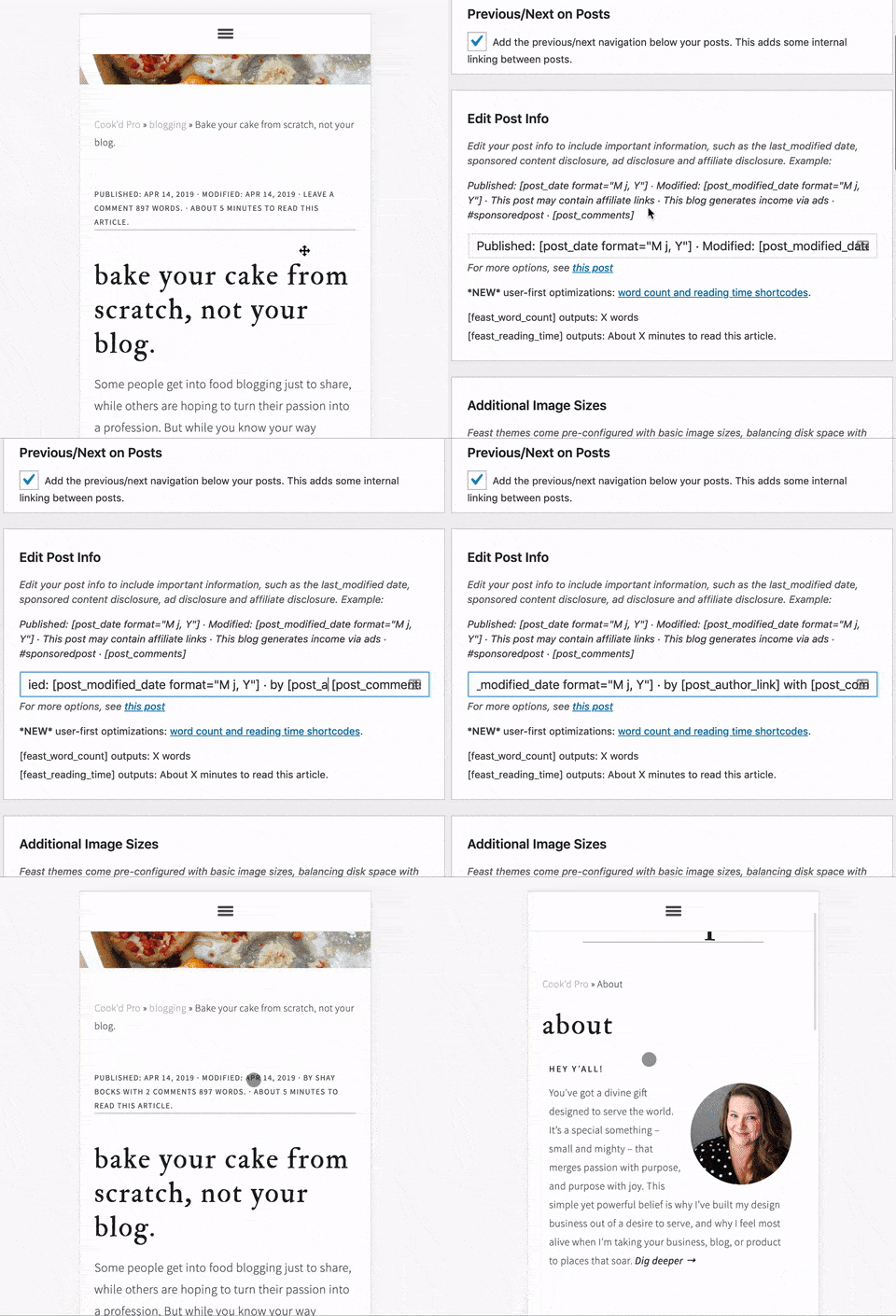
Edit Post Info: Author byline

See this SEMRush webinar with Casey Markee about why the post author information is important. We also have this post on recipe quality guidelines.

Your post_author_link is set in your Admin -> Users -> Your Profile -> Website field.

FTC Disclosures

Comply with blogging laws and regulations by adding disclosures for your privacy policy, ads, and sponsored content.

According to FTC requirements for disclosures, the disclosures need to be the same font, size and color as the body text and must appear before the first link.

Because of this, we don't recommend or support modifying the "Edit Post Info" to appear smaller than the body text.

We don't think they hurt.

But they can also be put into the post content on a post-by-post basis.

Conditionally display Updated date

The Feast Plugin automatically hides the updated date if it's less than 7 days after the published date, to improve user experience. It just isn't useful to know if a post was updated immediately after publishing.

This only applies if the "Edit Post Info" field has the same value as the recommended text we provide. If you customize the post info, this doesn't work.

For example, if you published a post on October 1st and updated it on October 6th, only the published date will show.

If you edited the post on October 8th, then the published date and the updated date will show.

Note: this will not affect the schema that gets sent to Google

Thanks to Arsen and Casey for this suggestion.

One-Date Logic

Raptive has advocated for one-date logic, with the goal of improving click-through-rates from Google Search, which may help Google detect and display the most recent date.

The simplest way to achieve this is to only display the modified/update date, and remove the published date entirely from the post info. The modified/updated date is always going to be the most recent date.

We see no issues with doing this.

Dates as a ranking factor

Dates are not a ranking factor, period.

This was abused over a decade ago by SEOs and Google explicitly stated at the Google Webmaster Conference in 2019 that it places zero trust in the dates provided by websites.

Instead, Google crawls and indexes pages, and uses its own crawl date as the date of that content, for ranking purposes.

Accessibility

Changing the font, font color or font size can lead to decreased accessibility compliance. The post info we provide through our theme and setup is specifically designed to optimally comply with accessibility requirements around font, font size, and color.

If you choose to change the post info font, font size, font weight or color, you may negatively impact accessibility compliance and are creating a custom theme.

Bold text

You can wrap <b></b> tags around text that you want bolded, eg.

<b>Updated: [post_modified_date format="M j, Y"] · Published: [post_date format="M j, Y"]</b> by [post_author_link] · This post may contain affiliate links · [post_comments]

Note that failing to properly close a tag can make the entire page bolded.

This will break the Conditionally Display Updated feature above.

There's very limited number for HTML tags in the post info due to constraints in WordPress.

Move Post Info Above Title

When using the Feast Plugin v.12.0.0+ and Foodie Pro 5, you can now move the post info above the post title in the Feast Plugin Settings:

This is purely visual and has no affect on anything for SEO and accessibility.

Was this helpful?

  • Happy
  • Sad
Modern FooterUpdate Author Bio

Products

  • Feast Plugin
  • Feast+
  • Feast+ White Glove
  • Feast+ Style Refresh
  • Done-for-you Services
  • Demo trial
  • Themes
  • Theme Install Service
  • Classic Themes
  • Lattice Plugin
  • Travel
  • Logo creation

Help

  • Kadence tutorials
  • Kadence Install
  • Documentation & Tutorials
  • Feast+ Members
  • Discounts & Coupons
  • Trellis 2.0
  • Trellis
  • Trellis Migration
  • Compatibility
  • Support
  • Legal resources
  • Genesis vs. Kadence
  • Changelog
  • How to start a blog course

Company

  • Privacy Policy
  • Refund Policy
  • Terms & Conditions
  • Why Feast
  • Principles & Best Practices
  • Affiliates
  • Contact
  • Opinion Disclaimer
  • AI Policy

Copyright ©  2026 · Feast Design Co. Results not typical or guaranteed. Our themes and plugins are just a small part of the overall effort involved in running a food blog. Nothing on this website shall constitute legal or financial advice, always consult a local lawyer and accountant. Accessing this website and all transactions herein are under the laws and jurisdiction of Toronto, Ontario, Canada. All pricing is USD.

  • Get the Feast Plugin
  • Documentation
    • Feast Plugin
    • Feast+
  • Open a Support Ticket
Facebook X Instagram
Search