
Below is a list of services and plugins that we've tested to be compatible with our recommended setup, and offer support for.
Incompatible simply means that we don't offer support for sites with the plugin installed because of issues we've encountered on other sites.
As a general philosophy, users land on your site looking for the recipe and that can be delivered with a very simple, basic HTML page. Anything that adds clutter and complexity to this one simple task is going to negatively impact user experience, and cause you maintenance and troubleshooting headaches.
Except for Yoast, WP Rocket, newsletter signups, recipe cards and ads, you want to avoid embedding unnecessary plugins like the plague (or be prepared to pay a lot of money for developer help).
Jump to:
Pagespeed
For simplicity sake, let's just say that the ONLY pagespeed plugin you need is WP Rocket. Ditch anything else.
Incompatible
- Jetpack
- Jetpack Boost
- Autoptimize
- SG Optimizer / SG Cache
- Flying images
- Flying scripts
- W3 Total Cache
- WP Super Cache
- WP Optimize
Compatible
While we don't specifically list Perfmatters as incompatible, it's unnecessary with WP Rocket installed and we don't support it due to myriad complications it can introduce with double caching and duplicate functionality.
Pagebuilders
Incompatible
- Beaverbuilder
- Publishpress
- Elementor
- Divi
- Visual composer
- Themify
- EditorsKit
Compatible
None - use the block editor
Pagebuilders are used to build landing pages with specific styles and custom functionality, and while they can be useful for specific landing pages, they simply aren't appropriate for recipe posts.
Block editor
Incompatible
- Gutenberg
- Disable Gutenberg
- Classic Editor
- Site Editor / WP Editor
Compatible
None; use the block editor, which is built into WordPress and doesn't require a plugin
As of 2021, everybody should be using the block editor. Do not install the Gutenberg plugin - this is highly experimental and only for developers.
SEO
Incompatible
- Redirection
- Rankmath
- Schema Plus
Compatible
While Yoast implements a lot of necessary parts (such as schema), it isn't going to do the SEO work for you - you still need to do keyword research. Ignore Yoasts content suggestions in the post editor.
Accessibility
Incompatible
- Accessibe
- Userway
- pojo / one-click accessibility
Compatible
None
Accessibility plugins do not improve compliance and can often create additional issues. In many cases, they provide a false sense of security rather than addressing real accessibility requirements. See this resource on accessibility plugins.
Security
Incompatible
- Really Simple SSL
Compatible
A proper host (eg. BigScoots, Agathon)
Spam
Incompatible
- Cleantalk
Compatible
- Antispam Bee
- Akismet (note: we highly recommend Antispam Bee over this)
Analytics
Incompatible
- MonsterInsights
- Google Analytics Dashboard WP (GAD WP)
- Google Analytics for WordPress
Compatible
Google Site Kit
Non essential
These plugins are either part of an outdated setup, or interfere with modern best practices and should be removed.
Incompatible
- Gallery (of any kind)
- Lightbox (of any kind)
- Sliders (of any kind)
- Instagram widgets (of any kind)
- Javascript-based filter
- Woocommerce
- WP User Avatar
- Better click to tweet
- WordPress Hide Posts
Compatible
None; just remove them.
Image optimization
Incompatible
- Smush
- SGOptimizer
- Jetpack
Compatible
Social
Incompatible
- Shareaholic
- Social warfare
Compatible
Comments
We recommend relying on the core WordPress comment system rather than unreliable third-party services.
Incompatible
- WP Discuz
- Disqus
- Thrive comments
- Jetpack comments
- Commentluv
- Lazyloading (any kind)
Compatible
None; remove them and rely on the core WordPress comments system
Website owners are also responsible under the GDPR for which third parties they allow on their websites.
Disqus fined 2,500,000 Euro over GDPR violations
Recipe Card
Incompatible
- Zip recipes
- Easy recipes
- Recipe card blocks
- WP Ultimate Recipe
- Blossom recipe maker
- WP Zoom
- Cooked
- Cookbook
- Gourmet Recipes
Compatible
- WP Recipe Maker
- Create
Forms
Incompatible
- WP Forms
- Contact Form 7
- WPForms
- Ninja forms
- Gravity forms
- Jetpack
Compatible
None; simply list your email address on the contact page and make sure you're using Cloudflare to block bots
App / PWAs
Incompatible
- AppMySite
Compatible
None; at this time we're not aware of PWAs being a viable solution
Search
Incompatible
- Search exclude
- Better Search
Compatible
We have some modifications to the core WordPress search and FSRI blocks that may be interfered with by any search plugin.
Note: Slickstream and Grow override all site search settings and while they're fully compatible with the Feast Plugin setup, they're also entirely separate. They don't perform searches on your site, instead, searches are routed through their third-party servers using javascript, which may be GDPR violations. We don't offer any support for these plugins - all support must go directly to their developers.
Newsletters
We recommend avoiding embedding newsletter forms on every page and instead, creating a dedicated subscribe page.
Consent banners
For GDPR and CCPA, there are various laws you need to comply with. Unfortunately this is a very specific and technical area, that we specialize in as a theme company, so we can't officially recommend or support this.
Non plugins
We also recommend removing javascript/links to "badges" or "networks" as these provide no user value and only benefit the site being linked to, not you eg.
- foodgawker
- healthyaperture
- gluten free blog network
- finding vegan
- "top 100 blogs" etc.
- nfca
If these were implemented by loading javascript or external images, they can have serious negative impacts on pagespeed and CLS.
We also recommended removing:
- anything in the "Before Header" widget area, as this can cause CLS issues
- any category drop-down menu (recipe index, sidebar)
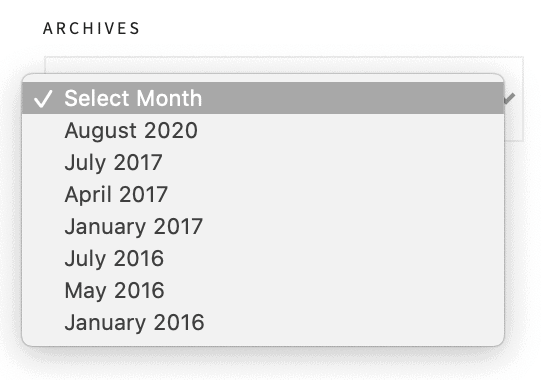
- any date-based filtering option
Self audit
If you're still running into issues, we suggest doing a self-audit by disabling plugins one-by-one until the issue disappears, which tells you which plugin is causing the issue.
Ideally, you would do this on a staging site created through your host company, so that your live site is unaffected.
Note that on low quality hosts, disabling a plugin may not immediately reflect the change because of overaggressive caching or inadequate server resources. You'll need to hard refresh your cache and/or contact the host for additional assistance.