Skip to content
Feast Design Co.
  • Get the Feast Plugin
  • DocumentationExpand
    • Feast Plugin
    • Feast+
  • Open a Support Ticket
New to Feast? Start Here
Login/Account
Feast Design Co.

We recommend all sites migrate to our Kadence Themes.

Getting Started

4
  • Migrating to Feast
  • Staging Site
  • Kadence Tutorials
  • Sign Up For The Newsletter

Setup

14
  • Install Feast Plugin
  • Install Kadence
  • How to clear your cache
  • Favicon
  • Enable Recommended Settings
  • Enable Feast Layouts
  • Disable Trackbacks
  • Complete Site Info
  • Update Author Bio
  • Optimize Images
  • Clear Inactive Widgets
  • Review Tools
  • Plugin Audit
  • Clear Cache ‼️

Plugin Settings

23
  • 728px
  • Full width page
  • Subscribe button
  • Modern Search
  • Recipe Key
  • Widen recipe card on mobile
  • FAQ Toggle
  • AI Buttons
  • Automatic Trending Posts
  • Feast Plugin Features and Benefits
  • Social Icons
  • Post Template
  • Table of Contents
  • Post IDs
  • Google Trusted Source
  • Edit Leave a Reply
  • Disable Trackbacks
  • Modern Previous + Next
  • Posts per page
  • Breadcrumbs
  • Productivity
  • Smooth scrolling
  • Image unlink
  • Replace recipe card Jump To buttons
  • BETA

Block Editor 101

5
  • Block options
  • Block Editor
  • Block themes
  • Patterns
  • Why we don't support block-level styling

Blocks & Patterns

16
  • Buttons
  • Recipe Rating
  • Featured Comment
  • Post Template
  • Numbered Lists
  • Table of Contents
  • Full Width Banner
  • Featured Recipe Pattern
  • Why we don't support block-level styling
  • Process Shots
  • Inline Heading Group Block
  • Step Instructions
  • Advanced "Jump To" Links
  • Reader Review
  • Feast Patterns
  • Displaying Post Blocks (FSRI)
  • Displaying Category Blocks (FSCI)
  • Scheduled Categories

Page Templates

3
  • Custom 404
  • How to use Categories
  • Shop page

Customize

10
  • Kadence Spacing
  • Customizer
  • Customizations
  • Reset Kadence Color Palette
  • Customization Referrals
  • Why we don't support block-level styling
  • Per Page CSS
  • Why you shouldn't make customizations
  • Custom CSS
  • Customization Support

Images

11
  • Post Images
  • Favicon
  • Webp
  • Default Image Size
  • Modern post image sizes
  • How thumbnails work
  • Modern Thumbnails (Featured Images)
  • Troubleshooting Featured Images
  • Displaying Post Blocks (FSRI)
  • Process Shots
  • Image Alt Tags
  • Why do my images look different in edit post and live?

Logo & Fonts

7
  • Retina Quality Logo
  • Flush Local Fonts Cache
  • Create your logo
  • Edit Body Font Size
  • Favicon
  • Fonts
  • Logo

Menu

1
  • Kadence Menu Background Image

Categories

3
  • Why Isn't the Category Description Appearing?
  • Displaying Category Blocks (FSCI)
  • How to use Categories

Recipes

7
  • Recipe Rating
  • Reviews
  • Recipe Key
  • Ingredients
  • Displaying Category Blocks (FSCI)
  • Displaying Post Blocks (FSRI)
  • Featured Recipe Pattern
  • All Recipes

Feast+

35
  • Setting Up Prebuilt Pages
  • What is Feast+?
  • Feast+ Setup
  • Design Kits
  • Feast+ Fonts
  • Feast+ FAQ
  • Feast+ Showcase
  • Feast+ Patterns
    • As seen in
    • Top Banner
    • Custom list styling
    • Numbered Lists
    • Full Width Banner
    • Feast+ Footer
    • Feast+ Call to Action
    • Icon Tip Boxes
    • As Seen In
    • Reader Review
  • Feast+ Pre-Built Pages
    • Setting Up Prebuilt Pages
    • Feast+ Homepage
    • Feast+ Index
    • Feast+ Category Pages
    • Social Landing Page (Link In Bio)
  • Feast+ Features
    • Full-Width Post Header
    • Custom List Styling
    • Colored Numbered Lists
    • Top 10 List Styling
    • Step Instructions
    • Heading Styling
    • Top of Site CTA Banner
    • Custom Background Pattern
  • Design Kits
    • Feast+ Design Kits (Members)
    • Feast+ Design Kit Library
    • Feast+ Design Kit Instructions
  • Branding & Design
    • Feast Fonts
    • Feast+ Branding & Design

Speed & SEO

25
  • Automatic Trending Posts
  • Image Alt Tags
  • Speculative Loading
  • Google Trusted Source
  • Should I remove content?
  • 301 Redirects, Links, Canonical and Pagespeed
  • Image file size vs. pagespeed
  • Duplicate Content
  • Lazyloading comments
  • CLS
  • Blocking Time
  • Linking
  • SEO
  • Skip lazy loading first post image
  • Horizontal scrolling
  • Smooth scrolling
  • fetchPriority
  • Redis Object Cache
  • Pagination
  • Pingbacks
  • INP (Interaction to Next Paint)
  • Animations
  • Indexed
  • Google Discover
  • CDNs
  • Site Speed

Social Sharing

3
  • Social Icons
  • Tiktok
  • Social

Blogging Resources

19
  • Food Blog Sitelinks
  • Photography
  • Understanding "penalties"
  • Web Stories
  • Linking
  • Posts vs. Pages
  • AI Content
  • Food Blog Page Structure
  • Food Blog Site Structure
  • Comments
  • Internal links
  • Analytics
  • Pagespeed
  • SEO for Food Bloggers
  • Modern guidelines for page headings
  • How to Write a Recipe Post
  • Recipe Page Guidelines for Food Bloggers
  • Image Optimization
  • Recipe Update Checklist

Legal Resources

6
  • Legal Resources
  • DMCA and Copyright Infringement
  • Copyrights
  • Accessibility
  • Blog insurance
  • Private Label Rights (PLR)

Integrations

11
  • Ecommerce
  • Ingredients
  • Google Trusted Source
  • Contact Forms
  • Hosting
  • Translation
  • Minification
  • WP Recipe Maker
    • Reviews
    • QR Code
    • Ingredients
  • WP Rocket
    • Minification

Troubleshooting

15
  • XML-RPC
  • Block Editor errors
  • Block Editor Unresponsive
  • Why do my images look different in edit post and live?
  • Why Isn't the Category Description Appearing?
  • Troubleshoot Plugin Conflicts
  • How to clear your cache
  • Flush Local Fonts Cache
  • How to update your theme
  • Feast Plugin FAQ
  • W3 HTML Validation
  • Sorry, this file type is not permitted for security reasons.
  • Troubleshooting Featured Images
  • Either "name" or "item. name" should be specified (in "itemListElement")
  • This block contains unexpected or invalid content
  • Incompatible Archive
  • Clear Cache ‼️
  • Cloudflare Speed Brain

Comments

1
  • Featured Comment
  • Comment Subscribe

Developer Resources

6
  • Multisite
  • Feast Plugin Deprecated
  • W3 HTML Validation
  • Feast Plugin: Disable Theme Google Fonts
  • Rethinking the Thumbnails
  • Design

Genesis Setup (Legacy)

13
  • Edit Post Info
  • Modern Navigation
  • Layout
  • Modern Index
  • Feast Plugin Setup
  • Modern Homepage Setup
  • Modern Menu for Desktop
  • Modern Mobile Menu
  • Sidebar
  • Modern 404
  • Modern Recipe Index
  • Modern Categories
  • Modern Footer
View Categories
  • Home
  • Documentation
  • Plugin Settings
  • Automatic Trending Posts

Automatic Trending Posts

0:00 / 5:20
  • View as Markdown Open this page as plain Markdown (opens in a new tab)
  • Export PDF Download this page as a PDF
  • Open in ChatGPT Ask questions about this page (opens in a new tab)
  • Open in Claude Ask questions about this page (opens in a new tab)
  • Open in Google AI Studio Ask questions about this page (Google account required) (opens in a new tab)

Automatic Trending Posts keeps the trending recipes on your site up to date for you. Every few days, the Feast Plugin checks which of your posts got the most clicks from Google search over the last 30 days, and puts them first in any Simple Recipe Index (FSRI) block that's sorted by Post Order:

  • links your best-performing posts from your homepage, sidebar, recipe index and about page
  • reinforces the posts that are already doing well in search
  • replaces hand-picked Post IDs, so there's nothing to update by hand

It requires the free Site Kit by Google plugin to be installed, active and connected to Google Search Console. Automatic Trending Posts is included with every Feast Plugin license, except Feast Plugin Starter.

Jump to:
  • Why it helps
  • Why it uses Google search clicks
  • Where to find it
  • How it works
  • Set it up
  • Show trending posts with the FSRI block
  • Related
  • Sources

Why it helps

Every site should link to its trending posts. Internal links show search engines which pages matter most on your site, and a "popular recipes" section that appears on every page is one of the clearest ways to do that. On the Food Blogger Pro podcast, SEO consultant Casey Markee calls this kind of section a "strong reinforcement signal" for your best content.

The posts that already get clicks from Google are the ones most worth reinforcing. Keeping them linked from your busiest pages helps them hold their place in search, and those rankings bring in the readers who see your ads. Every reader who clicks through to another popular recipe is another page of ad impressions.

It also takes a chore off your list. Keeping a trending section current used to mean looking up your top posts, pasting their Post IDs into each FSRI block, and doing it all again as the seasons changed. Automatic Trending Posts does this for you on a schedule.

Why it uses Google search clicks

Posts are ranked by their clicks from Google search, as reported by Search Console: the number of times someone clicked through to that post from Google's search results.

Traffic from Pinterest, social media and email isn't counted. Those readers don't find your posts through search rankings, so internal links don't change how much of that traffic a post gets. Search traffic is the traffic internal linking can actually help, so that's what the ranking is based on.

Where to find it

The setting is at Admin > Feast Plugin > Settings > Posts > Automatic Trending Posts. On some sites the Feast Plugin menu is named after your theme, for example Feast Kadence.
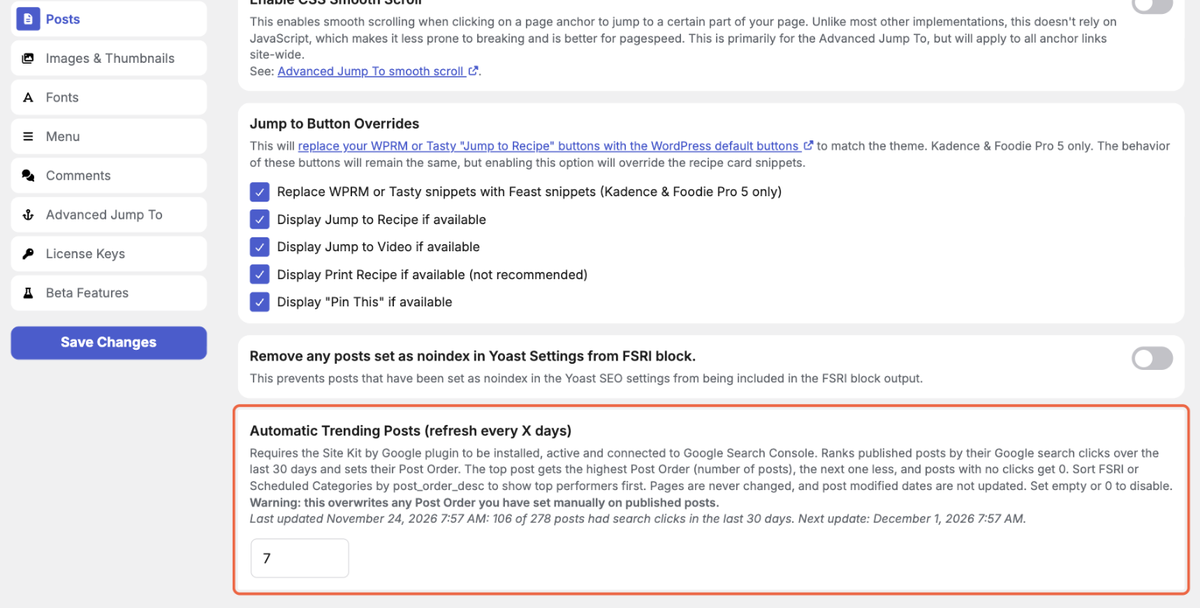
Feast Plugin Settings, Posts tab, with the Automatic Trending Posts setting outlined and set to refresh every 7 days
Admin > Feast Plugin > Settings > Posts > Automatic Trending Posts

How it works

  • Every time it refreshes, it looks at your Google search clicks for the last 30 days.
  • The post with the most clicks gets the highest Post Order (the number of published posts on your site), the next post gets one less, and so on.
  • Published posts with no clicks in the last 30 days get a Post Order of 0.
  • Only posts are ranked. Pages, like your homepage, about, contact and recipe index pages, are never changed.
  • The last updated date on your posts isn't changed.
  • Under the setting, you'll see when it last ran, how many posts had search clicks, and when it will run next.
  • If Site Kit can't return your Search Console data (for example, it has been disconnected), the error is shown under the setting, your Post Order is left as it was, and it tries again a day later.
  • Turning it off stops the updates and leaves your current Post Order in place.

Automatic Trending Posts overwrites any Post Order you've set by hand on published posts. If you use Post Order to arrange posts yourself, leave this setting off.

Set it up

  1. Install and set up Site Kit by Google by following Site Kit's own setup guide. Search Console is connected for you as part of that setup.
  2. Go to Admin > Feast Plugin > Settings > Posts.
  3. In Automatic Trending Posts, enter how often to refresh, in days. We recommend 30. If your traffic is seasonal (holiday baking, summer grilling and so on), use 14 so your trending posts keep up with the season.
  4. Click Save Changes. The first update runs within a few minutes on most sites. Reload the page to see when it last ran.
  5. Set your FSRI blocks to show your trending posts (below).

To turn it off, empty the field (or enter 0) and click Save Changes.

Show trending posts with the FSRI block

Use the Simple Recipe Index (FSRI) block anywhere you used to show trending recipes by adding Post IDs. We recommend:

  • homepage: 8 posts
  • sidebar: 4 posts
  • recipe index: 8 posts
  • about page: 8 posts

For each block:

  1. Edit the page (or your sidebar widgets) and select the FSRI block, or add one with Block inserter (+) > Simple Recipe Index (FSRI).
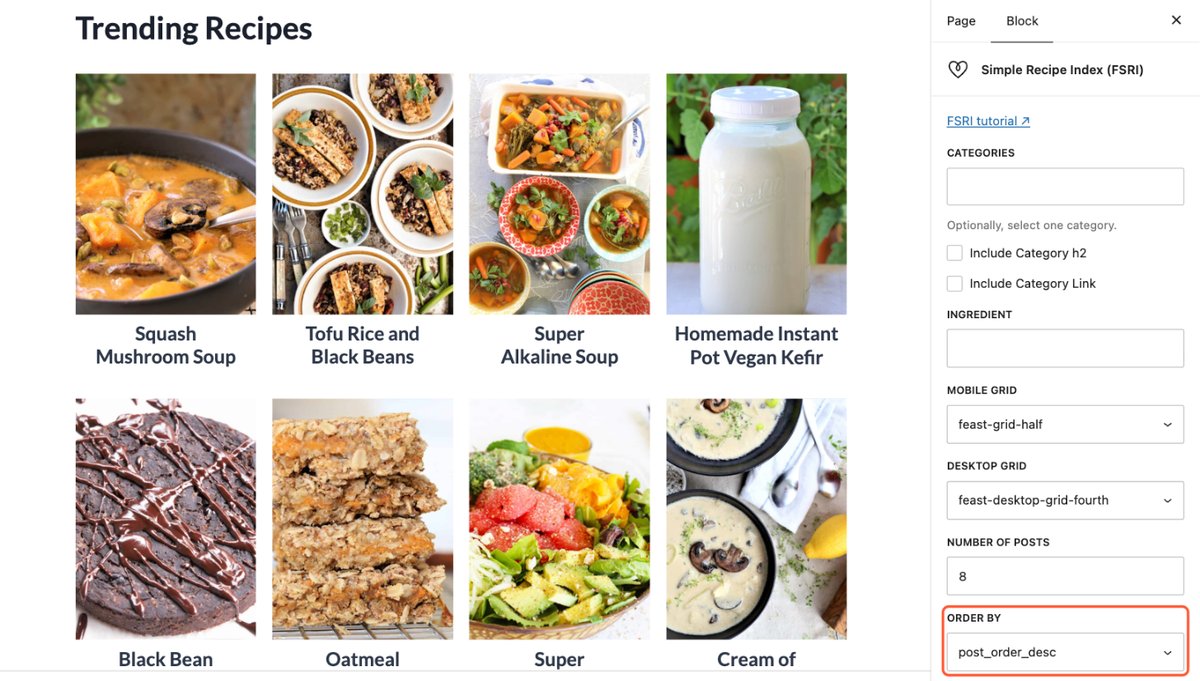
  2. In the block settings, set Order By to post_order_desc. This shows the highest Post Order first.
  3. Set Number of Posts.
  4. Empty the Post IDs field. Post IDs always override Order By, so the block keeps showing your hand-picked posts until this field is empty.
  5. Save the page.
Simple Recipe Index (FSRI) block showing 8 trending recipes, with Order By set to post_order_desc in the block settings
Block inserter (+) > Simple Recipe Index (FSRI) > Order By > post_order_desc

A few tips:

  • To show trending posts from one category only, select it under Categories.
  • Exclude Previous is on by default. It skips posts already shown by FSRI blocks higher up on the same page, so your trending block won't repeat them.

Related

  • Displaying Post Blocks (FSRI)
  • Internal links
  • Sidebar
  • Post IDs

Sources

  • Install and set up Site Kit – Site Kit by Google
  • Search Console – Site Kit by Google
  • Performance report (Search results) – Search Console Help
  • E-E-A-T, Static Homepages, AI, and More Food Blog SEO Advice with Casey Markee – Food Blogger Pro

Was this helpful?

  • Happy
  • Sad
AI ButtonsFeast Plugin Features and Benefits

Products

  • Feast Plugin
  • Feast+
  • Feast+ White Glove
  • Feast+ Style Refresh
  • Done-for-you Services
  • Demo trial
  • Themes
  • Theme Install Service
  • Classic Themes
  • Lattice Plugin
  • Travel
  • Logo creation

Help

  • Kadence tutorials
  • Kadence Install
  • Documentation & Tutorials
  • Feast+ Members
  • Discounts & Coupons
  • Trellis 2.0
  • Trellis
  • Trellis Migration
  • Compatibility
  • Support
  • Legal resources
  • Genesis vs. Kadence
  • Changelog
  • How to start a blog course

Company

  • Privacy Policy
  • Refund Policy
  • Terms & Conditions
  • Why Feast
  • Principles & Best Practices
  • Affiliates
  • Contact
  • Opinion Disclaimer
  • AI Policy

Copyright ©  2026 · Feast Design Co. Results not typical or guaranteed. Our themes and plugins are just a small part of the overall effort involved in running a food blog. Nothing on this website shall constitute legal or financial advice, always consult a local lawyer and accountant. Accessing this website and all transactions herein are under the laws and jurisdiction of Toronto, Ontario, Canada. All pricing is USD.

  • Get the Feast Plugin
  • Documentation
    • Feast Plugin
    • Feast+
  • Open a Support Ticket
Facebook X Instagram
Search